Virtuozzo#
Configure the target cloud in two ways: via the UI or via API functions.
To configure the target cloud via the UI, open the ACP. In the right part of the page, above the client list, click the Manage Clouds button. The page displays information about the target clouds. Use the available commands in the Actions menu to configure clouds. To add a cloud, click Add below the table with the list of target clouds.
To configure Virtuozzo target cloud select the OpenStack cloud type.
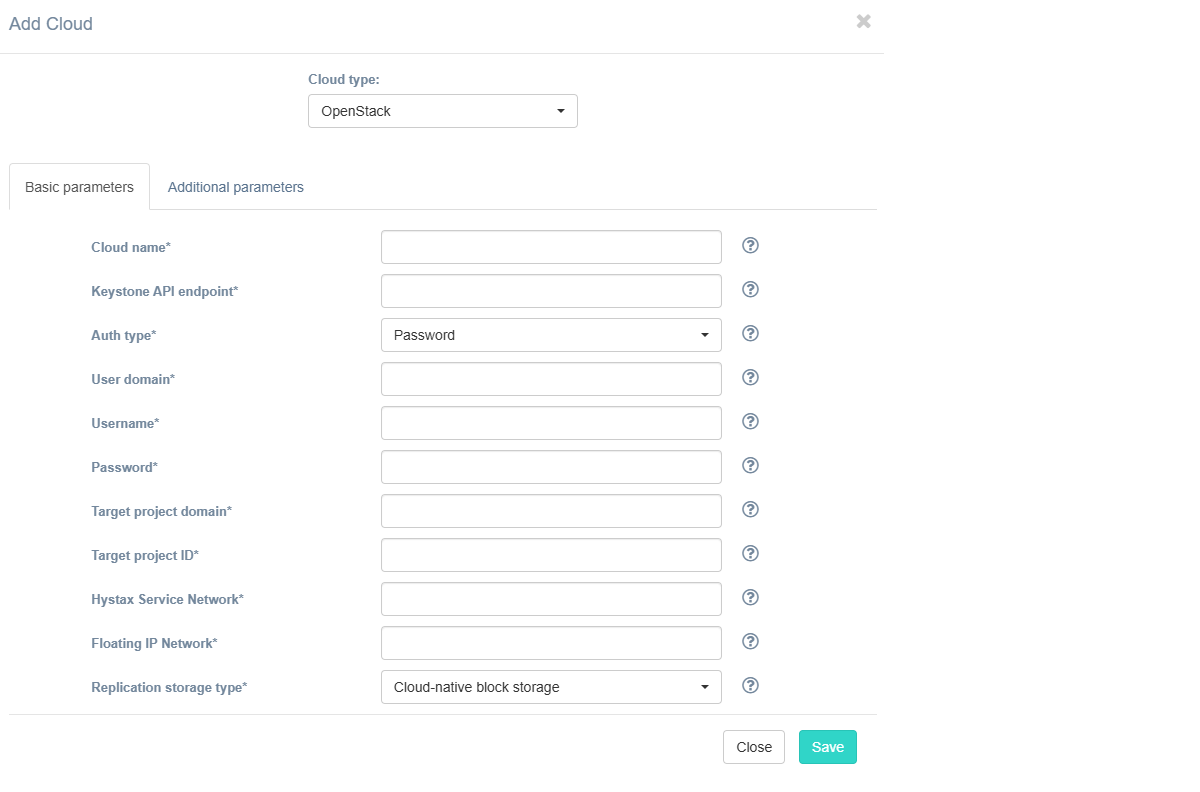
Fill in the fields on the Basic Parameters tab by providing information about the cloud configuration. Click "?" for field tips.
The table below provides a normative mapping between UI field labels and API parameter names used by Hystax Migration during cloud discovery, replication, and recovery workflows.
| Field name in UI / API | Description | Example |
|---|---|---|
Cloud name /name |
The cloud name to be displayed in the UI. The name must be unique. | test_cloud |
Keystone API Endpoint /endpoint |
fqdn of the Virtuozzo Hybrid infrastructure Admin panel listening on port 5000 (make sure the compute API traffic is on the public network). Used to authenticate for authentication. | http://fqdn-vhi-admin-panel:5000/v3 |
Auth type /auth_type |
Defines the authentication method (API values: password, token, or v3applicationcredential). |
Password |
User Domain /user_domain_name |
User domain name to access VHI (created on the first step in the cloud configuration). | Ringo-Cloud |
Username /username |
Username to access VHI Priject | migration-user |
Password /password |
Password to access VHI | password |
Token /token |
For token auth type. Authentication token. |
gAAAAABk12abcXYZexampleToken |
Credential ID /application_credential_id |
For auth type = Application credentials (v3applicationcredential in API). Application credential ID. |
1234567890abcdef1234567890abcdef |
Credential secret /application_credential_secret |
For auth type = Application credentials (v3applicationcredential in API). Application credential secret. |
mysecretcredentialkey |
Target Project Domain /project_domain_name |
Target VHI project domain name | Ringo-Cloud |
Target Project Name /project_id |
Target VHI project ID where replicated workloads are created. This is a UID that can be found in the Virtuozzo Hybrid Infrastructure Admin Panel: go to Projects and Users, click the target project, and copy the UID from the left-hand sliding panel. | c57dd14c08bc4d6780ab1787774fd6e8 |
Hystax Service Network /cloud_agent_network |
Network in which the Hystax cloud agent is deployed. Should be the same or routable to the network in which a Hystax Migration instance is located. | public |
Floating IP Network /floating_net |
External network that is used to attach Floating IPs to migrated machines. | public |
| Replication storage type / - |
Choose storage type to use for replicated data. Migration and recovery from cloud-native block storage is fastest, but the other storage types can be cheaper. Detailed description. | Cloud-native block storage |
Warning
There are two mandatory additional parameters that must be configured - P2V type and Cloud Site timeout:
1. Go to the Additional Parameters tab.
2. Select the P2V type parameter and set its value to virtuozzo.
3. Select the Cloud Site timeout parameter and set its value to 2880.
If required, configure other parameters. To do so, open the Additional Parameters tab, select the needed parameter, and specify its value. The tooltip system works the same way as on the Basic Parameters tab.
Additional parameters description:
| Field name in UI / API | Description |
|---|---|
API endpoint for block storage service /block_storage_endpoint_override |
Override API endpoint for block storage service. Useful on clouds with broken service catalog |
API endpoint for compute service /compute_endpoint_override |
Override API endpoint for compute service. Useful on clouds with broken service catalog |
API endpoint for image service /image_endpoint_override |
Override API endpoint for image service. Useful on clouds with broken latest API version |
API endpoint for network service /network_endpoint_override |
Override API endpoint for network service. Useful on clouds with broken service catalog |
API version for block storage service /block_storage_api_version |
Override API version for block storage service. Useful on clouds with broken latest API version |
API version for compute service /compute_api_version |
Override API version for compute service. Useful on clouds with broken latest API version |
API version for image service /image_api_version |
Override API version for image service. Useful on clouds with broken latest API version |
API version for network service /network_api_version |
Override API version for network service. Useful on clouds with broken latest API version |
Add custom x-sdn header /neutron_x_sdn_header |
Add custom x-sdn header for Neutron requests |
Add qemu_agent meta /add_qemu_agent_meta |
Insert qemu_agent meta parameters into metadata of volumes created by Migration |
Availability zone /availability_zone |
Availability zone where all resources will be created |
Cloud agent flavor /cloud_agent_flavor |
Flavor to use for the cloud agent instances |
Cloud agent flavor requirements /cloud_agent_flavor_requirements |
Requirements for cloud agent flavor in JSON format, for example: {"cpu": "value", "ram": "value", "hdd": "value"} |
Cloud agent image ID/name /cloud_agent_image_name |
ID/name of the cloud agent image from the target cloud |
Cloud agent security group /cloud_agent_security_group |
Security group used by Cloud Agents |
Cloud agent volume type /cloud_agent_volume_type |
Cloud agent volume type |
Cloud Site parallel resources limit /cloud_site_parallel_resources_limit |
How many resources of the same type are allowed to be created in parallel during Cloud Site creation |
Cloud Site replications launch timeout (minutes) /cloud_site_status_change_timeout |
Timeout for a launch of replications during Cloud Site creation (in minutes) |
Cloud Site replications timeout (minutes) /cloud_site_replication_timeout |
Timeout for a replications during Cloud Site creation (in minutes) |
Cloud Site timeout /cloud_site_timeout_min |
Cloud Site creation timeout in minutes |
Disable failback ports /disable_failback_ports |
Disable custom ports for failback (they will be created by the cloud automatically) |
Disable failover ports /disable_failover_ports |
Disable custom ports for failover (they will be created by the cloud automatically) |
Enable ransomware protection /enable_ransomware_check |
Detect and suspend machines with abnormally large incremental replication size to mitigate possible ransomware impact. |
Flatten manager URL /flatten_manager_url |
URL of service which will be called for performing flatten operations on volumes of the detached machines |
Insert os_tag key /os_tag_key |
Name of tag containing description of OS installed on device which will be inserted into metadata of volumes created by Migration |
Key pair name /key_name |
Key pair name to access the cloud agent |
Minimal count of cloud agents /min_ca_alive |
Minimum count of cloud agents which should stay alive according scaling policy |
Minimal volume size /min_volume_size |
Minimal size in gigabytes for replicated volumes. If source volume is smaller, target cloud volume will be extended up to minimal size |
P2V type /p2v_type |
In this field, you can specify a non-standard P2V - for example, for cloud "Virtuozzo, you need to specify "virtuozzo" |
Ransomware protection threshold /ransomware_threshold |
Ransomware protection threshold (in percent). Defines the maximum permissible size of incremental replication relative to the latest full backup. Exceeding this threshold triggers automatic machine suspension. |
Region /region_name |
Target region name |
Replicated volume type /failover_volume_type |
Default volume type used to create volumes for replicated VMs |
Save OS type in metadata /image_volume_metadata |
Save OS type in image volume metadata (only for Windows machines) |
Security group /security_group |
Name of the security group with all required ports opened |
Send replication data to cloud agent directly /use_receiver_mesh |
Check this box to send replication data directly to cloud agent, it can increase replication speed. |
Set custom image metadata /custom_image_metadata |
Set custom image metadata for replicated VMs. Must be a JSON object or a comma-separated string of key=value pairs. For example, hw_scsi_model=virtio-scsi,hw_disk_bus=scsi. Alternatively, this parameter can be set in the Migration Plan. Note that if you set the parameter both in the initial configuration and in the Migration Plan, the Migration Plan settings take priority and will be applied to the cloud, even if the value is an empty string. |
Set default tag /insert_default_tag |
Tag created resources with provided tag name |
Use cloud volumes directly /use_volume_directly |
Check this box to disable snapshot creation in cloud and use cloud volumes directly. Warning: not all controller functionality is supported in this mode. If unsure, keep this setting off. |
Use cloud-native UEFI /use_native_efi |
By default, all UEFI VMs are automatically converted to boot through BIOS. Set this parameter to disable conversion and use cloud-native UEFI boot instead. Please note, that some clouds support BIOS boot only and require this parameter to be disabled. |
Use public IP for cloud agent /use_ca_floating_ip |
Cloud Agent will be created with public IP and Migration will use public IP to connect to Cloud Agent |
The specified Virtuozzo Hybrid Infrastructure Platform user should have the following rights for Hystax Migration to operate correctly.
- Import image
- Launch instance
- Create volume
- Attach volume to instance
- Detach volume from instance
- Create volume snapshot
- Create volume from snapshot
- Remove snapshot
- Remove volume
- Manage networks
Note
The user created in the third step of the Cloud configuration is assigned the Project Manager role, which includes all of the above.
Click the Save button. The platform checks the entered data for correctness. If an error occurs, a notification appears.