Platform description#
Hystax Migration is a platform for business applications and IT infrastructure migration between clouds.
"Lift and shift" process consists of the initial replication of business application components (machines), infrastructure items to a target environment with a subsequent launch of the migrated workloads.
Replication is available for instances running on public clouds, VMware, Hyper-V, KVM, OpenStack, as well as for physical machines.
Since version 4.5, Hystax Migration also provides Direct2Target (D2T) — a migration feature that enables virtual machines to be replicated and migrated directly to a target cloud environment without dependency on target platform APIs. The feature uses a D2T image containing the cloud agent to transfer data directly to the target disks and automatically prepares the recovered machine for production use after migration cutover. See Direct2Target migration.
Architecture#
The platform consists of server and client parts. The server one contains components, which are deployed on AWS from AMI or a golden image on KVM Platform and responsible for retrieving changes from customer machines, their deduplication, storing data and running migrations as well.
As for the client part, it includes agents installed on VMware vSphere/oVirt/OpenStack for replication of machines on the cloud platform or agents for Windows/Linux installed on guest operating systems for replication of other types of cloud platforms and physical machines.
Client for VMware (VMware agent) - a Linux machine, supplied as an OVA file, that is deployed to each ESXi host or cluster and that replicates machines on these hosts. Standard VMware tools are used to detect changes and retrieve deltas on virtual machines via the Changed Block Tracking (CBT) API. These tools, in turn, trigger the operating system's mechanisms (such as quiesce) to ensure data consistency within the replicas. An agent instance must have at least 2 vCPUs and 4 GB of RAM and must be deployed on each ESXi host or cluster containing machines designated for replication.
Note
An ESXi host or cluster detection depends on cloud configuration settings according to the discovery level.
Client for oVirt (oVirt agent) - a Linux machine, supplied as an RAW file, that is deployed on the main data center and that replicates machines on it.
Client for OpenStack (OpenStack agent) - a Linux machine, supplied as an RAW file, that is deployed on the main data center and that replicates machines on it.
Linux agent - a Linux daemon installed on a guest OS in case of replicating machines on public clouds like AWS, Microsoft Azure, or Google Cloud as well as Hyper-V, KVM, OpenStack, or physical machines with Linux operating systems. Supplied as a .rpm or .deb package to be installed in the guest operating systems.
Windows agent - a Windows service installed on a guest OS in case of replicating machines on public clouds like Microsoft Azure or Google Cloud as well as Hyper-V, KVM, OpenStack or physical machines with Windows operating systems. Supplied as a ZIP file with MSI and a configuration file for installation on a guest operating system.
Warning
In case of a VMware/oVirt infrastructure replication, there is no need to install Windows/Linux agents on each machine. Just install a VMware agent on each ESXi host of vSphere.
Network schema#
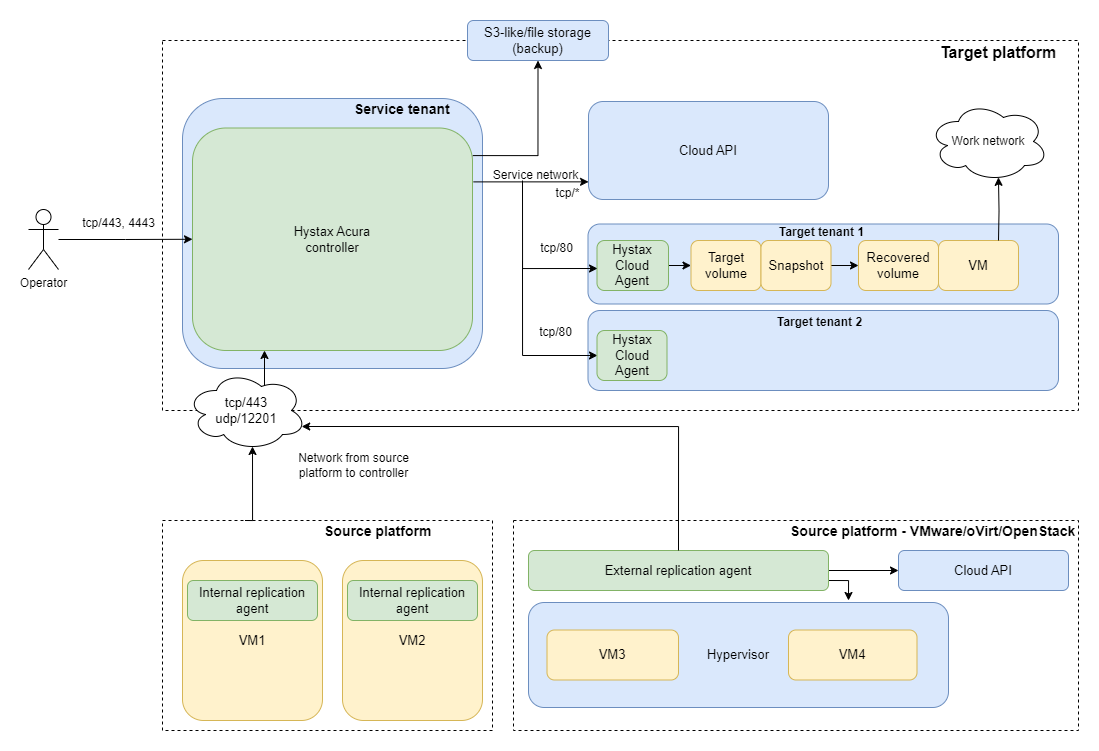
The replication workflow involves three main components:
- Replication Agent – collects replication data from the source environment.
- Hystax Migration Controller – orchestrates replication and communicates with the target cloud.
- Cloud Agent – receives replication data in the target environment and writes it to the target storage.
Replication Agent
The Replication Agent is deployed in the source environment. It is downloaded from the Migration web UI and can be deployed in one of the following ways:
- Internal Replication Agent – installed as a service on each source machine.
- External Replication Agent – available for VMware, oVirt, and OpenStack source environments. It is downloaded as an OVA or RAW image and deployed as a dedicated virtual appliance on the customer's hypervisor.
Once the Replication Agent is installed and running, the source machine is automatically discovered in the Migration Control Panel (ACP) and becomes available for replication.
The Replication Agent:
- connects to the Migration Controller over TCP port 443;
- sends logs over UDP port 12201.
The Replication Agent does not require Internet access as long as it can reach the Migration Controller over the network.
Cloud Agent
The Cloud Agent receives replication data from the Controller and writes it to the target storage.
For most supported target clouds, the Controller automatically creates a dedicated Cloud Agent for each customer.
For VMware and oVirt target environments, the Cloud Agent is downloaded from the Customer page and deployed manually. It communicates directly with the target hypervisor.
The Cloud Agent:
- receives replication data over TCP port 80;
- writes replication data to the target storage;
- for VMware target environments, transfers replication data to the target hypervisor over TCP port 902 and UDP port 902.
Hystax Migration Controller
The Controller coordinates the replication workflow and communicates with the target infrastructure.
The Controller:
- communicates with supported cloud APIs using the ports required by the selected cloud provider;
- communicates with VMware vSphere over TCP port 443;
- communicates with VMware vCloud Director over TCP port 443.
For VMware environments, both the Controller and the Cloud Agent communicate with VMware vSphere over TCP port 443.
Storage connectivity
Storage connectivity depends on the selected storage type.
- When using object storage or file storage, the Controller must have network access to the storage because it resides outside the target cloud.
- When using block storage, no additional Controller connectivity is required because replication data is stored directly within the target cloud.
Direct2Target schema#
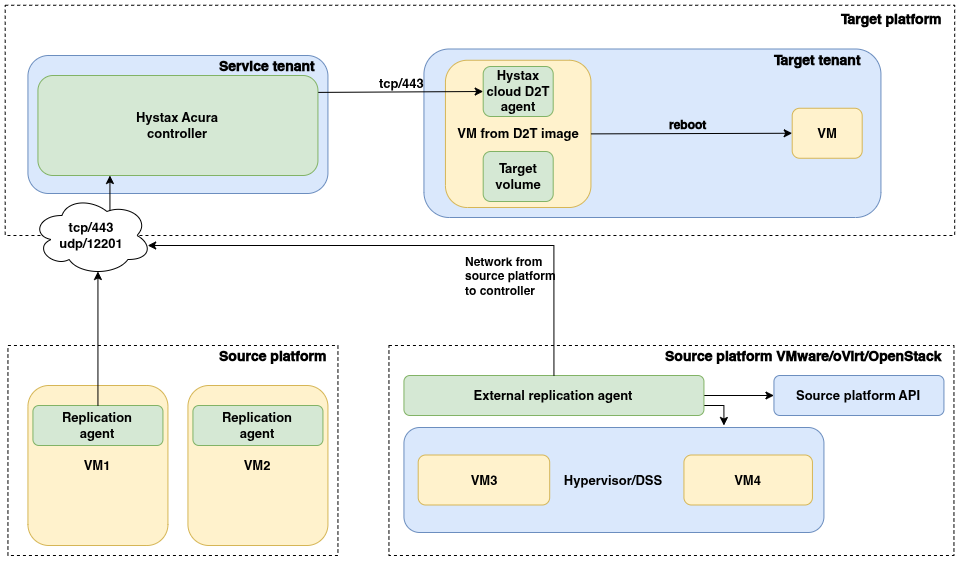
- On the source platform, replication agents (internal agents on VMs or an external agent for VMware/oVirt/OpenStack) send replication data to the network.
- Data and metadata are transferred from the source site to the Hystax Migration Controller (ports TCP/443 and UDP/12201).
- On the target platform, a virtual machine deployed from the D2T image (downloaded in advance from the customer page) runs the Cloud Agent, which receives replicated data and writes it directly to the target disks.
- During replication, the Hystax Migration Controller manages the deployed D2T agent (port TCP/443).
- When Receiver Mesh is enabled, Replication Agents can send data directly to D2T Agents.
- After the migration cutover, the recovered machine is automatically prepared for production use. The D2T agent is removed, third-party components are cleaned up, and the machine boots from the recovered operating system.
This flow requires the following manual operations:
- Download the D2T image from the customer page and deploy a target virtual machine from the image.
- Configure the target virtual machine and its disk layout.
- Configure the migrated machine in the Migration Control Panel to use the deployed D2T agent.
Important
- Each virtual machine being migrated requires a dedicated target virtual machine deployed from the D2T image.
- The target machine's disk configuration must match the source machine's configuration: the number of disks must be the same, and each target disk must be at least as large as the corresponding source disk.
- After a migrated virtual machine is detached from Migration, it is no longer managed by the product. Any subsequent management operations must be performed outside Migration.
- Do not reboot the target virtual machine running the D2T agent or restart the D2T agent services during replication, between replication cycles, or between recovery operations. Doing so can result in an inconsistent replication state and may require the migration process to be restarted.
Base data flow#
The replication workflow transfers data from the source environment to the selected storage in the target cloud. The data flow depends on the storage configuration selected for the replication plan.
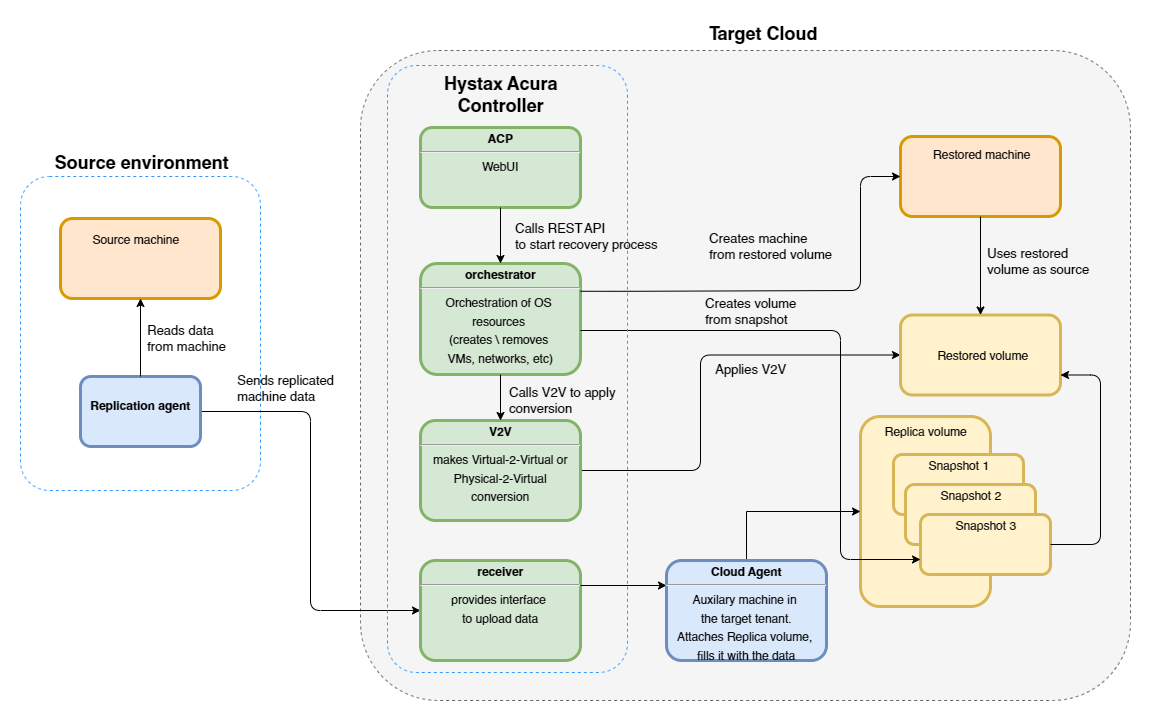
Migration supports the following storage options:
- Cloud-native block storage – recommended for migration and disaster recovery scenarios.
- Custom storage configuration (expert) – allows replication data to be stored in customer-managed storage.
Data replication#
Replication begins when a machine with a running Replication Agent is registered in the Migration Control Panel (ACP) and replication is enabled.
The Replication Agent transfers replication data to the Hystax Migration Controller, which orchestrates the replication workflow according to the configured replication schedule.
The subsequent data flow depends on the selected storage configuration.
Cloud-native block storage
The Controller forwards replication data to the Cloud Agent, which writes it to block storage in the target cloud. During subsequent replication cycles, only changed blocks are transferred, and recovery points are created according to the configured policy.
Note
For VMware and oVirt target environments, the Cloud Agent must be deployed manually. For all other supported target clouds, it is created automatically by the Controller.
Custom storage configuration (expert)
When custom storage is used, the Controller transfers replication data to the configured storage. The target cloud is not involved in storing replication data.
The replication schedule is configured by the administrator in the Migration Control Panel (ACP).
Data storage#
The selected storage configuration determines where replication data is stored and how it is recovered.
Cloud-native block storage
Replication data is stored as volumes and snapshots in the target cloud. These snapshots serve as recovery points that can be used to recover virtual machines with minimal recovery time. This option is recommended for migration and disaster recovery scenarios where fast recovery is required.
Custom storage configuration (expert)
Replication data is stored in the customer-configured storage. The storage implementation and retention capabilities depend on the selected storage backend.
Data recovery#
The recovery workflow depends on the selected storage configuration.
Cloud-native block storage
Recovery is performed entirely within the target cloud. The Controller creates a recovery volume from the selected recovery point, provisions a virtual machine, attaches the recovery volume, and completes the recovery process.
Because recovery data is already stored in the target cloud, virtual machines can typically be recovered within minutes.
Custom storage configuration (expert)
Recovery begins by restoring the selected recovery point from the configured storage to a recovery volume in the target cloud. After the recovery volume is created, the remaining workflow is identical to cloud-native block storage recovery: the recovery volume is attached to a newly created virtual machine, which is then started.
Note
Recovery time depends on the selected storage configuration, the amount of replicated data, and the complexity of the protected machine.
Alternative data flow#
By default, Replication Agents send replication data to the Hystax Migration Controller, which then forwards the data to the Cloud Agent in the target cloud.
Receiver Mesh provides an alternative replication data path. When it is enabled, Replication Agents send replication data directly to Cloud Agents instead of routing the data through the Controller. The Controller continues to orchestrate the replication workflow.
Receiver Mesh is disabled by default. Enable it when replication data should be transferred directly to Cloud Agents. This can reduce the load on the Controller and improve replication performance, especially when multiple machines are replicated in parallel.
Configure Receiver Mesh as an additional target cloud parameter during the initial setup or later. See Enable Receiver Mesh. For the required ports, see Network Connections.
Deployment requirements#
For details about the Receiver Mesh mode referenced in the table, see Receiver Mesh.
| Hystax Migration Component | System Requirements | Network Requirements (Allow traffic to/from the following ports) |
|---|---|---|
| Hystax Migration (controller): deployed from the image provided by Hystax |
8 vCPUs Memory: 16 GB RAM Disk space: 200 GB SSD drive |
- Ingress - tcp/443 - Ingress - tcp/4443 - Ingress - udp/12201 - Egress - tcp/443 - Egress - tcp/80 - to the Hystax Cloud Agent - Egress - tcp/8899 - to the Hystax Cloud Agent when Receiver Mesh is enabled |
| Cloud Agent (VMware): downloaded from Migration Control Panel and deployed from an OVA template |
2 CPUs Memory: 4 GB RAM |
- Ingress - tcp/80 - Ingress - tcp/8899 - required when Receiver Mesh is enabled - Egress - tcp/udp 902 - to ESXi hosts - Egress - tcp/443 - to vCenter and ESXi hosts |
| Cloud Agent (oVirt): downloaded from Migration Control Panel and deployed from a RAW disk |
2 CPUs Memory: 4 GB RAM 20 GB disk |
- Ingress - tcp/80 - Ingress - tcp/8899 - required when Receiver Mesh is enabled - Egress - tcp/443, udp/12201 |
| Cloud Agent (all other supported cloud platforms): deployed automatically in the target project |
2 CPUs Memory: 4 GB RAM |
- Ingress - tcp/80 - Ingress - tcp/8899 - required when Receiver Mesh is enabled - Egress - tcp/443, udp/12201 |
| Replication Agent Windows: downloaded from Migration Control Panel – internal |
Memory: 2 GB RAM CPU: x64 processor Disk space: 100 MB required for product installation and not less than 15% free space of disk size for VSS snapshots creation Microsoft .NET Framework 4.0 |
- tcp/443 - send data to the Migration host - udp/12201 - send logs to Migration - tcp/80, tcp/8899 - send data directly to the Cloud Agent when Receiver Mesh is enabled |
| Replication Agent Linux: downloaded from Migration Control Panel – internal |
Memory: 500 MB RAM Disk space: 100 MB required for product installation and not less than 15% free space of disk size for snapshots creation |
- tcp/443 - send data to the Migration host - udp/12201 - send logs to Migration - tcp/80, tcp/8899 - send data directly to the Cloud Agent when Receiver Mesh is enabled |
| Replication Agent VMware: downloaded from Migration Control Panel – external |
2 CPUs Memory: 4 GB RAM There are several host permissions that the VMware Replication Agent requires to operate. |
- Source host - tcp/443 - vSphere host - tcp/443 - ESXi host(s) - tcp/udp 902 - udp/12201 - receive logs from the Migration cluster - tcp/80, tcp/8899 - send data directly to the Cloud Agent when Receiver Mesh is enabled |
| Replication Agent oVirt: downloaded from Migration Control Panel – external |
2 CPUs Memory: 4 GB RAM 20GB disk |
- Source host - tcp/443 - udp/12201 - receive logs from the Migration cluster - tcp/80, tcp/8899 - send data directly to the Cloud Agent when Receiver Mesh is enabled |
| Replication Agent OpenStack: downloaded from Migration Control Panel – external |
2 CPUs Memory: 4 GB RAM 20GB disk |
- Source host - tcp/443 - udp/12201 - receive logs from the Migration cluster - tcp/80, tcp/8899 - send data directly to the Cloud Agent when Receiver Mesh is enabled |
Migration compatibility matrix and supported systems#
Supported platforms and applications#
Source Clouds:
- Platform-level replication — VMware, OpenStack, and oVirt.
- Machine-level replication — virtual machines running on any virtualization platform, as well as physical machines.
Target Clouds
OpenStack, VMware, oVirt, OpenNebula, Amazon Web Services (AWS), Google Cloud Platform (GCP), Alibaba Cloud, Apache CloudStack, CloudSigma, Flexible Engine, Hyper-V, IONOS, KubeVirt, Microsoft Azure, Nebius, Nutanix, Oracle Cloud, Red Hat OpenShift Virtualization, STACKIT, VMware Cloud Director (tenant level).
Target Clouds
OpenStack, VMware, oVirt, OpenNebula, Amazon Web Services (AWS), Google Cloud Platform (GCP), Alibaba Cloud, Apache CloudStack, CloudSigma, Flexible Engine, Hyper-V, IONOS, KubeVirt, Microsoft Azure, Nebius, Nutanix, Oracle Cloud, Red Hat OpenShift Virtualization, STACKIT, Virtuozzo, VMware Cloud Director (tenant level).
The Direct2Target migration type is platform-agnostic. It supports the target platforms listed above as well as other cloud and virtualization platforms, such as Proxmox VE, XCP-ng, Citrix XenServer, and SUSE Virtualization.
Applications:
SAP, Microsoft Active Directory, PostgreSQL, Oracle, NGINX, Red Hat Jboss Enterprise, IBM WebSphere, Apache, VMware vSphere, MongoDB, Hadoop, Spark, MySQL, and others.
Replication Agent Deployment Matrix#
Platforms and corresponding applicable Migration replication agent types:
| Source Environment | Internal Agent | Deployment Method |
|---|---|---|
| VMware | HWRAgent — Windows; HLRAgent — Linux |
MSI installer DEB / RPM |
| OpenStack | HWRAgent — Windows; HLRAgent — Linux |
MSI installer DEB / RPM |
| Flexible Engine | HWRAgent — Windows; HLRAgent — Linux |
MSI installer DEB / RPM |
| oVirt | HWRAgent — Windows; HLRAgent — Linux |
MSI installer DEB / RPM |
| Other virtualization platforms and clouds | HWRAgent — Windows; HLRAgent — Linux |
MSI installer DEB / RPM |
| Bare Metal | HWRAgent — Windows; HLRAgent — Linux |
MSI installer DEB / RPM |
Internal Agents OS compatibility:
| Agent | OS |
|---|---|
| HWRAgent - Hystax Windows Replication Agent | Windows 2008R2 and later (x64) |
| HLRAgent - Hystax Linux Replication Agent | AlmaLinux 8.4, 8.5, 8.6 CentOS 6.5+, 7.1+, 8.0+, 9.0+ Debian 7, 8, 9, 10, 11, 12, 13 Oracle Linux 6.10, 7.9, 8.10, 9.5 RHEL 6.5+, 7.1+, 8.0+, 9.0+, 9.7, 10.0, 10.1 SLES 15 SP6 Ubuntu 14.04, 16.04, 18.04, 20.04, 22.04, 24.04, 25.10, 26.04 |
Linux kernel support for Linux agent#
Note
The version ranges indicate the earliest and latest supported builds in each kernel family. Not every intermediate build is necessarily supported. To check whether your Linux kernel version is supported, see List of supported versions.
RHEL/CentOS
| Kernel family | Supported versions |
|---|---|
| 2.6.32-x | 2.6.32-220…2.6.32-754 |
| 3.10.0-x | 3.10.0-123…3.10.0-1160 |
| 4.18.0-x | 4.18.0-80…4.18.0-553 |
| 5.14.0-x | 5.14.0-70…5.14.0-611 |
| 6.12.0-x | 6.12.0-55…6.12.0-124 |
Ubuntu/Debian
| Kernel family | Supported versions |
|---|---|
| 3.2.x | 3.2.0-4 |
| 3.13.0-x | 3.13.0-24…3.13.0-170 |
| 3.16.0-x | 3.16.0-4…3.16.0-77 |
| 4.2.0-x | 4.2.0-18…4.2.0-42 |
| 4.4.0-x | 4.4.0-21…4.4.0-210 |
| 4.15.0-x | 4.15.0-20…4.15.0-213 |
| 4.18.0-x | 4.18.0-13…4.18.0-25 |
| 5.0.0-x | 5.0.0-15…5.0.0-37 |
| 5.3.0-x | 5.3.0-19…5.3.0-64 |
| 5.4.0-x | 5.4.0-26…5.4.0-216 |
| 5.8.0-x | 5.8.0-23…5.8.0-63 |
| 5.10.0-x | 5.10.0-1…5.10.0-39 (including -cloud variants) |
| 5.15.0-x | 5.15.0-25…5.15.0-176 |
| 6.1.0-x | 6.1.0-1…6.1.0-44 (including -cloud variants) |
| 6.8.0-x | 6.8.0-31…6.8.0-110 |
| 6.12.x | 6.12.31…6.12.74 |
| 7.0.0-x | 7.0.0-14 |
P2V / V2V Operating System Compatibility#
This section lists the verified operating systems supported by Migration’s P2V/V2V module. Other operating systems would work as well, but they have not been tested.
| OS Family | Versions Supported |
|---|---|
| AlmaLinux | 8.4, 8.5, 8.6 |
| Debian | 7, 8, 9, 10, 11, 12, 13 |
| Oracle Linux | 6.10, 7.9, 8.10, 9.5 |
| RHEL / CentOS | 6.5+, 7.1+, 8.0+, 9.0+, RHEL 9.7, RHEL 10.0, RHEL 10.1 |
| SLES | 11, 12, 15 SP6 |
| Ubuntu | 14.04, 16.04, 18.04, 20.04, 22.04, 24.04, 25.10, 26.04 |
| Windows Desktop | Windows 7, 8, 8.1, 10, 11 |
| Windows Server | 2008 R2, 2012, 2012 R2, 2016, 2019, 2022, 2025 |
Recommended configurations#
When deploying Hystax Migration for Migration platform the configuration depends on the total amount of machines, desired amount of simultaneously replicated machines and the type of installation - for a test, for a single migration project or to provide service.
Examples of typical configurations:
| Type of installation | Total amount / amount of simultaneously replicated machines | Amount of nodes | Configuration of each node: CPU / RAM / Disk cores |
|---|---|---|---|
| Test | 50 / 5 | 1 | 8 / 16 GB / 200 GB SSD |
| Single project | 150 / 20 | 1 | 12 / 24 GB / 200 GB SSD |
| Single project | 350 / 40 | 1 | 16 / 32 GB / 200 GB SSD |
| Single project | 1000 / 100 | 1 | 24 / 48 GB / 300 GB SSD |
| Providing service | 1000 / 100 | 3 | 16 / 32 GB / 300 GB SSD |
| Providing service | 3000 / 200 | 3 | 24 / 48 GB / 300 GB SSD |
Recommended High-performance configurations#
Note
These recommendations are valid when there is migration of a large number of VMs include large VMs (>10 TB).
1. Make sure the configurations meets the requirements:
Note
The following table is valid for a VMware external agent.
| Type of installation | Total amount / amount of simultaneously replicated machines | Amount of nodes | Configuration of each node: CPU / RAM / Disk cores | Resources for agent | Number of service’s copies |
|---|---|---|---|---|---|
| Single project | 1000 / 100 | 1 | 24 / 128 GB / 300 GB SSD | 16 cores, 32 GB RAM | auth – 10 restapi – 12 acp – 3 receiver – 12 keeper – 5 |
| Providing service | 1000 / 100 | 3 | 24 / 128 GB / 300 GB SSD | 16 cores, 32 GB RAM | auth – 15 restapi – 18 acp – 5 receiver – 18 keeper – 8 |
2. Get ready for and use HotAdd transport mode.
Hystax Migration limitations#
- Virtual machines with disks engaged in SCSI bus sharing are not supported because VMware does not support snapshotting such VMs.
- Linux machines with static IP addresses will keep the original network settings. Refer to our KB article for a workaround.
- RDM virtual disks in physical mode, Independent disks, and disks connected via in-guest iSCSI initiator are not supported. Network shares and mount points targeted to 3rd party storage devices are also skipped, as these volumes/disks are not visible in the VM configuration file.
- Free ESXi is not supported. Hystax Live Migration to AWS or KVM Platform leverages vSphere and vStorage APIs that are disabled by VMware in free ESXi.
- Hystax Windows Replication Agent supports NTFS, ReFS filesystems.
- Hystax Windows Replication Agent converts dynamic disks to basic ones while migrating them.
- Hystax Linux Replication Agent supports replication of machines with up to 64 disks.
- Hystax Linux Replication Agent does not support installation or operation on systems with Secure Boot enabled.
- Windows servers with the enabled Storage Replica feature are not supported.
- Ephemeral networks are not supported.
- Virtual machines that use mdraid as the root filesystem have limited support. Recovery options and P2V/V2V migration are limited. For RHEL, CentOS, and similar operating systems, required drivers must be manually added to dracut on the source VM before replication / migration. The
rclocal_scriptandfix_dev_prefixscripts specified in the Migration Plan are not executed. - The P2V migration does not support BIOS-to-UEFI conversion. The
firmwareparameter specified in the Migration Plan must match the firmware mode used by the source machine.
AWS Limitations#
Hystax Migration uses an import image mechanism to launch replicated machines on AWS, therefore all "Import Image" limitations apply. Refer to the official AWS documentation for more details.
Azure Limitations#
- No ssh key can be attached to failover instances, as they are created from volumes.
- Mac address cannot be set for NIC.
- Every failover instance will have an extra temporary storage volume. Volume size depends on the flavor. More information can be found at: https://blogs.msdn.microsoft.com/mast/2013/12/06/understanding-the-temporary-drive-on-windows-azure-virtual-machines/
- No security groups will be assigned to failover instances by default. Refer to Migration Plans section and use the key "security_group" in Migration Plans.
- CentOS 6.2 migration is not supported. Refer to https://docs.microsoft.com/en-us/azure/virtual-machines/linux/endorsed-distros for further details.
KubeVirt Limitations#
-
The only networking option is the pod network. It is used for Cloud Agents and can be used for migrated VMs by setting
podas theSubnet IDin the Migration Plan. -
Setting an IP address in the Migration Plan is not applied.
-
Subnet discovery in the Migration Plan does not return any CIDR.
-
The machine remains blocked until recovery is deleted or detached.
-
If recovery is deleted, the next replication is full.
VMware Limitations#
- Max number of restore points stored for one machine is 29.
- Replication and failover of the same machine can't be started at the same time because both processes work with the same machine on the target side.
Replicated machines licensing on AWS#
According to the AWS requirements, machines running Red Hat Enterprise Linux (RHEL) must have Cloud Access (BYOL) licenses in order to be copied to AWS, whereas Windows machines will use the AWS licensing. For more information, please refer to the official AWS guide