CloudSigma#
Configure the target cloud in two ways: via the UI or via API functions.
To configure the target cloud via the UI, open the ACP. In the right part of the page, above the client list, click the Manage Clouds button. The page displays information about the target clouds. Use the available commands in the Actions menu to configure clouds. To add a cloud, click Add below the table with the list of target clouds.
Select the CloudSigma cloud type.
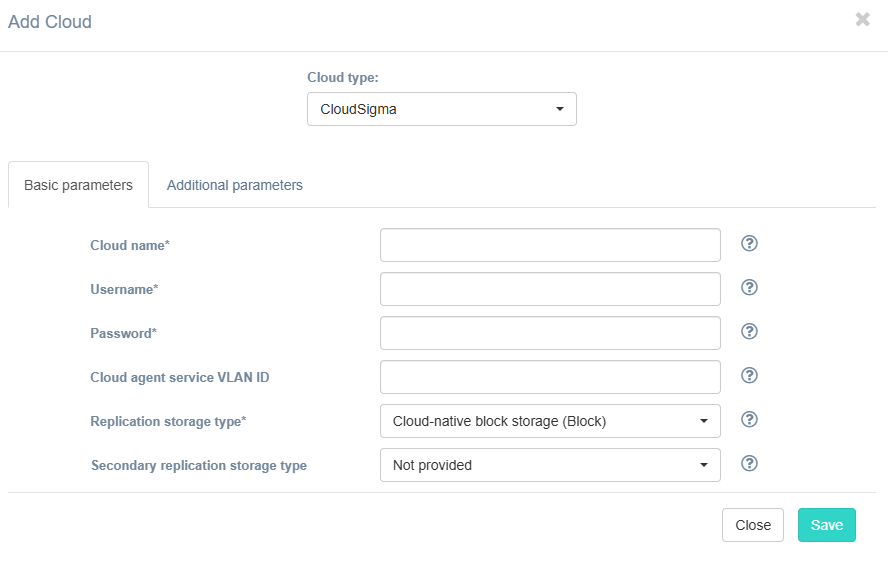
Fill in the fields on the Basic Parameters tab by providing information about the cloud configuration. Click "?" for field tips.
The table below provides a normative mapping between UI field labels and API parameter names used by Hystax Disaster Recovery during cloud discovery, replication, and recovery workflows.
| Field name in UI / API | Description | Example |
|---|---|---|
Cloud name /name |
The cloud name to be displayed in the UI. The name must be unique. | test_cloud |
Username /username |
Username to access the target cloud | [email protected] |
Password /password |
Password to access the target cloud | password |
Cloud agent service VLAN ID /cloud_agent_service_vlan_id |
If configured, VLAN with this id will be assigned to cloud agent instance along with public IP | a1b2c3d4-e5f6-7890-abcd-ef1234567890 |
| Replication storage type / - |
Choose storage type to use for replicated data. Migration and recovery from cloud-native block storage is fastest, but the other storage types can be cheaper. Detailed description. | Cloud-native block storage (Block) |
| Secondary replication storage type / - |
Secondary replication storage type Choose secondary storage type to use for replicated data. If chosen, data will be written to both storages simultaneously. | Not provided |
If necessary, add information about additional parameters. To do this, go to the Additional Parameters tab, select the required parameter, and enter its value. The tooltip system works similarly to the Basic Parameters tab. Description of additional parameters:
| Field name in UI / API | Description |
|---|---|
API endpoint for compute service /compute_endpoint_override |
Override API endpoint for compute service. Useful on clouds with broken service catalog |
CPU frequency per core /cpu_frequency |
CPU frequency per core multiplier |
CPU model /cpu_model |
CPU model for created VMs |
Cloud Site parallel resources limit /cloud_site_parallel_resources_limit |
The number of same-type resources that can be created in parallel during Cloud Site creation |
Cloud Site replications timeout (minutes) /cloud_site_replication_timeout |
Timeout for a replications during Cloud Site creation (in minutes) |
Cloud Site timeout /cloud_site_timeout_min |
Cloud Site creation timeout in minutes |
Cloud agent capacity /max_assigned_volumes |
Set this to override cloud agent's assignable volumes capacity |
Cloud agent flavor /cloud_agent_flavor |
Flavor to use for the cloud agent instances |
Cloud agent flavor requirements /cloud_agent_flavor_requirements |
Requirements for cloud agent flavor in JSON format, for example: {"cpu": "value", "ram": "value", "hdd": "value"} |
Cloud agent image name /cloud_agent_image_name |
Name of the cloud agent image from the target cloud |
Cloud agent volume type /cloud_agent_volume_type |
Cloud agent volume type |
Disk bus /disk_bus |
Disk bus type for replicated VMs, for example "virtio" or "scsi" |
Enable ransomware protection /enable_ransomware_check |
Check this box to detect and suspend machines with abnormally large incremental replication size to mitigate possible ransomware impact |
Minimal count of cloud agents /min_ca_alive |
Minimum count of cloud agents which should stay alive according scaling policy |
P2V type /p2v_type |
Specify a non-standard P2V value. For example, for Virtuozzo Hybrid Infrastructure, specify \"virtuozzo\". |
Ransomware protection threshold /ransomware_threshold |
Ransomware protection threshold (in percent). Defines the maximum permissible size of incremental replication relative to the latest full backup. Exceeding this threshold triggers automatic machine suspension. |
Region /region_name |
Target region name |
Replicated volume type /failover_volume_type |
Default volume type used to create volumes for replicated VMs |
Send replication data to cloud agent directly /use_receiver_mesh |
Check this box to send replication data directly to cloud agent, it can increase replication speed. |
Skip quotas check /skip_quotas_check |
Skip checks of fitting into available subscribed resources. Warning: Enabling this parameter might cause burst usage of cloud resources |
Storage tier ID /storage_tier |
Override storage tier ID for storage type. By default Standard. |
Use cloud-native UEFI /use_native_efi |
By default, all UEFI VMs are automatically converted to boot through BIOS. Set this parameter to disable conversion and use cloud-native UEFI boot instead. Please note, that some clouds support BIOS boot only and require this parameter to be disabled. |
Use public IP for cloud agent /use_ca_floating_ip |
Check this box to create the Cloud Agent with a public IP. This IP will be used by Disaster Recovery to connect to the Cloud Agent. |
Click the Save button. The platform checks the entered data for correctness. If an error occurs, a notification appears.