Storage#
Configure the target file storage in two ways: via the UI or via API functions.
To configure the target file storage via the UI, open the ACP. In the right part of the page, above the client list, click the Manage Clouds button. The page displays information about the target clouds. Use the available commands in the Actions menu to configure clouds. To add a cloud, click Add below the table with the list of target clouds.
Select the Storage cloud type.
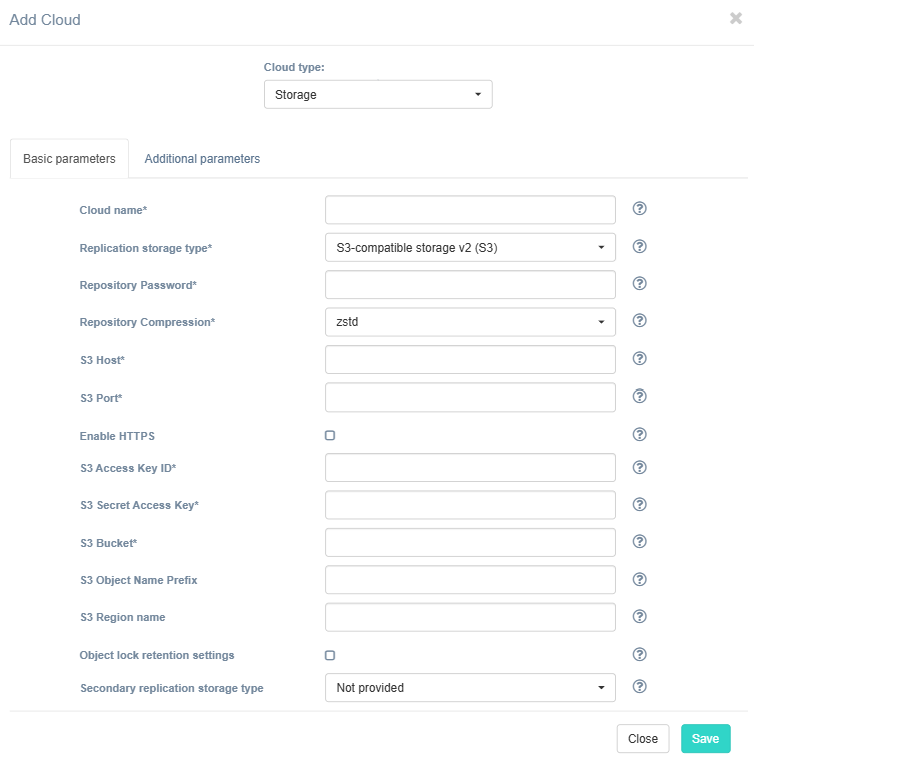
Fill in the fields on the Basic Parameters tab by providing information about the cloud configuration. Click "?" for field tips.
Important
For PostgreSQL backups, we recommend using S3-compatible storage V2 (S3). This storage type provides built-in deduplication, helping reduce storage consumption and speed up incremental backups.
The table below provides a normative mapping between UI field labels and API parameter names used by Hystax Disaster Recovery during cloud discovery, replication, and recovery workflows.
| Field name in UI / API | Description | Example |
|---|---|---|
Cloud name /name |
The cloud name as displayed in the UI. The name must be unique. | test_cloud |
| Replication storage type / - |
Choose storage type to use for replicated data. Detailed description. | S3-compatible storage V2 (S3) |
| Repository Password / - |
Password for data encryption. Encryption is configured automatically during initial storage connection, and the same password is required afterwards. | StrongPassword123! |
| Repository Compression / - |
Algorithm for data compression. Affects new data written to storage. | zstd |
| S3 Host / - |
S3 host | s3.amazonaws.com |
| S3 Port / - |
S3 port | 443 |
| Enable HTTPS / - |
Enable HTTPS for object storage connection. If unchecked, a less-secure HTTP connection will be used. | Enabled |
| S3 Access Key ID / - |
S3 access key id | AKIAIOSFODNN7EXAMPLE |
| S3 Secret Access Key / - |
S3 secret access key | wJalrXUtnFEMI/K7MDENG/bPxRfiCYEXAMPLEKEY |
| S3 Bucket / - |
S3 bucket | backups |
| S3 Object Name Prefix / - |
An additional string to prepend to all object names (optional). End the string with slash to store objects in a separate folder. For example, "backups/" stores backup data in the folder named "backups". | backups/ |
| S3 Region name / - |
Override the default region for s3 storage (optional) | eu-central-1 |
| Object lock retention settings / - |
Set object lock retention policy | unchecked |
| Secondary replication storage type / - |
Choose secondary storage type to use for replicated data. If chosen, data will be written to both storages simultaneously. | Not provided |
Click Save. The platform validates the entered data and displays a notification if any errors are detected.