




Table of contents
Backing up KubeVirt VMs means protecting virtual machines that now run as Kubernetes pods, using CSI snapshots of the VM’s persistent volume claims plus application-consistent freeze/thaw through the QEMU guest agent, not legacy VM-image backup. The VM definition, its DataVolumes and PVCs, and the data inside them are all Kubernetes objects. A KubeVirt backup is therefore a Kubernetes backup with virtualization awareness added on top.
Timing makes this urgent. Broadcom’s licensing changes have pushed thousands of teams to plan a VMware exit, and Red Hat OpenShift Virtualization, built on KubeVirt, is one of the most common landing zones. Those teams arrive with vSphere-era backup tools that assume a hypervisor API, vCenter, and VMDK files, none of which exist inside a Kubernetes VM. This article explains what changed, how KubeVirt backup works, which method fits which scenario, and how to extend backup into disaster recovery.
Why the VMware exit changed VM backup
The scale of the shift is measurable. Gartner analyst Julia Palmer predicts that 35% of VMware workloads will migrate to other platforms by 2028, and a survey cited by InformationWeek found that only 7% of IT organizations plan to remain fully on VMware. The window is finite too: vSphere 8 reaches end of general support in October 2027. On the destination side, Red Hat reported that the number of VMs running on OpenShift Virtualization grew 417% in 2025, clusters running VMs grew 93%, and Red Hat Services assessed more than 1.46 million VMs in migration engagements.
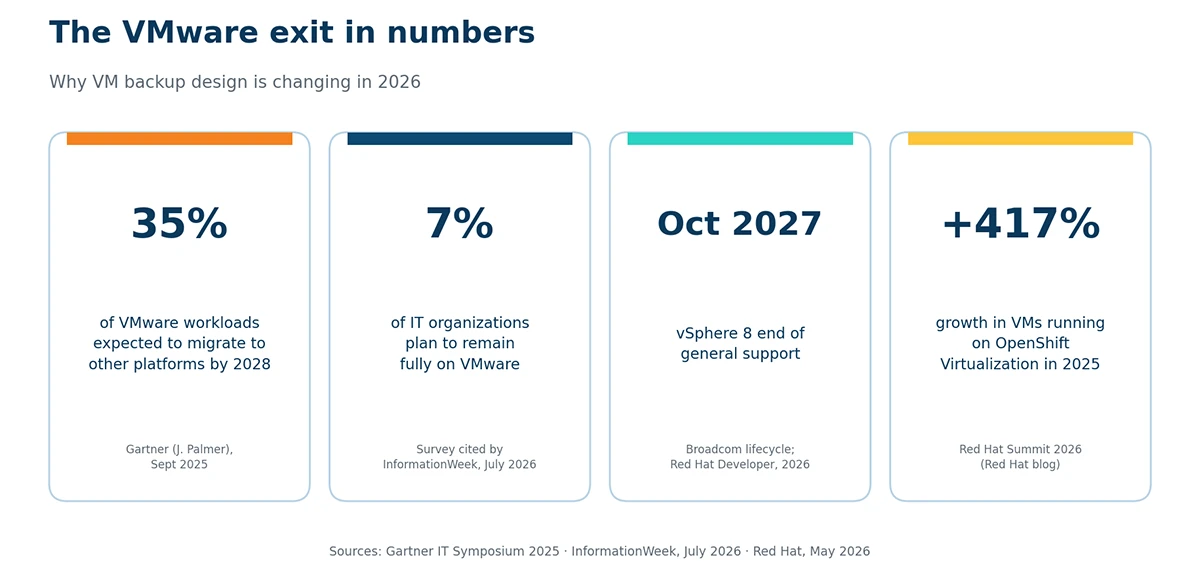
Figure 1. The VMware exit in numbers: Gartner 35% migration forecast, 7% staying fully on VMware (survey cited by InformationWeek), vSphere 8 end of support in October 2027, +417% VMs on OpenShift Virtualization (Red Hat, 2026)
What breaks after the move is the backup model itself. In vSphere, backup software talks to the hypervisor through VADP (vSphere APIs for Data Protection), tracks changed blocks, and reads VMDK files from the datastore. In KubeVirt, there is no vCenter, no VADP, and no VMDK. A virtual machine is a VirtualMachine custom resource. Its disks are PVCs (persistent volume claims), typically provisioned from DataVolumes by KubeVirt CDI (Containerized Data Importer), which imports a qcow2 or raw image into a volume. The running instance is a virt-launcher pod scheduled like any other workload.
A tool that only understands storage can copy PVC bytes, but it loses the VM specification, network attachment definitions, cloud-init secrets, and the relationships between them, so restore becomes manual reconstruction under pressure. There is a quieter risk as well: during replatforming, backup coverage often lapses silently, because the old vSphere agent is gone and nothing equivalent is configured on the Kubernetes side yet.
How KubeVirt backup works: CSI snapshots and freeze/thaw
A KubeVirt VM is a pod with one or more PVCs attached as disks, so a backup has two layers: the Kubernetes objects (VirtualMachine, DataVolume, PVC, Secrets, Services, NetworkAttachmentDefinitions) and the block data inside the PVCs. The object layer is plain YAML; the data layer is protected through the Kubernetes VolumeSnapshot API, implemented by your storage vendor’s CSI driver.
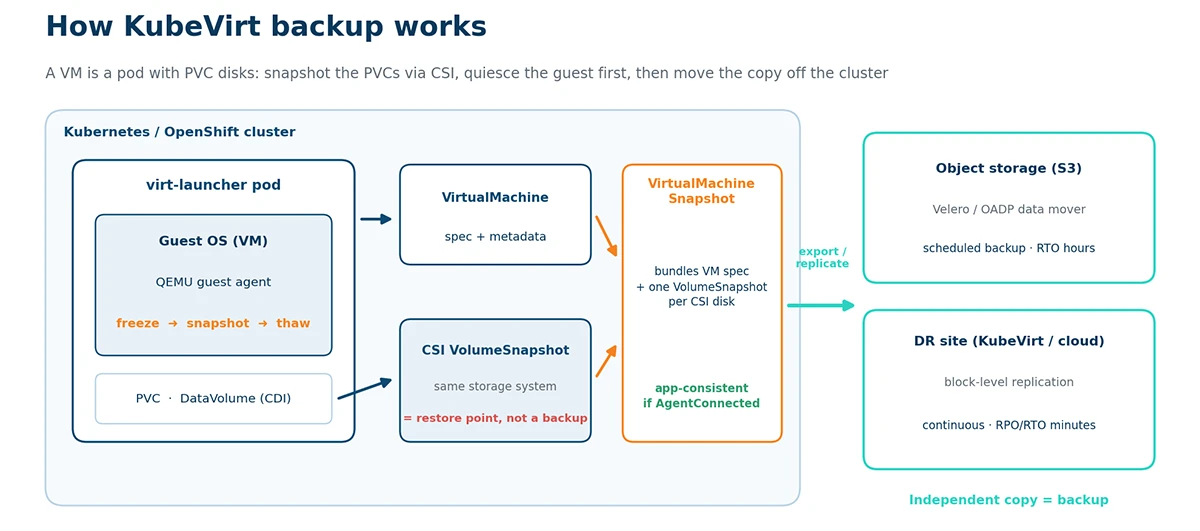
Figure 2. How KubeVirt backup works: guest agent freeze/thaw, CSI VolumeSnapshot per PVC, VirtualMachineSnapshot bundle, and the off-cluster copy that turns a restore point into a backup
When you create a VirtualMachineSnapshot, KubeVirt’s virtual machine snapshot object, the controller creates a VolumeSnapshot for every CSI-backed volume attached to the VM and stores a copy of the VM specification and metadata alongside it. Prerequisites are a StorageClass whose CSI driver supports snapshots, a VolumeSnapshotClass for that driver, and the Snapshot feature gate, which OpenShift Virtualization enables by default. According to the KubeVirt snapshot documentation, when the VM is running, the controller checks whether the QEMU guest agent is connected. If it is, KubeVirt freezes the guest filesystems, takes the snapshot, and thaws them afterward. Online snapshots have a default failure deadline of five minutes.
Freeze/thaw is what separates the two consistency levels every backup admin should be able to define:
- Crash-consistent backup captures the disk exactly as it would look after a sudden power loss. The filesystem and applications may need recovery on boot, and in-flight database writes can be lost.
- Application-consistent backup pauses writes and flushes buffers before the snapshot is taken, using freeze/thaw through the guest agent and, where needed, pre- and post-snapshot scripts that quiesce databases. The result restores cleanly without journal replay or database recovery.
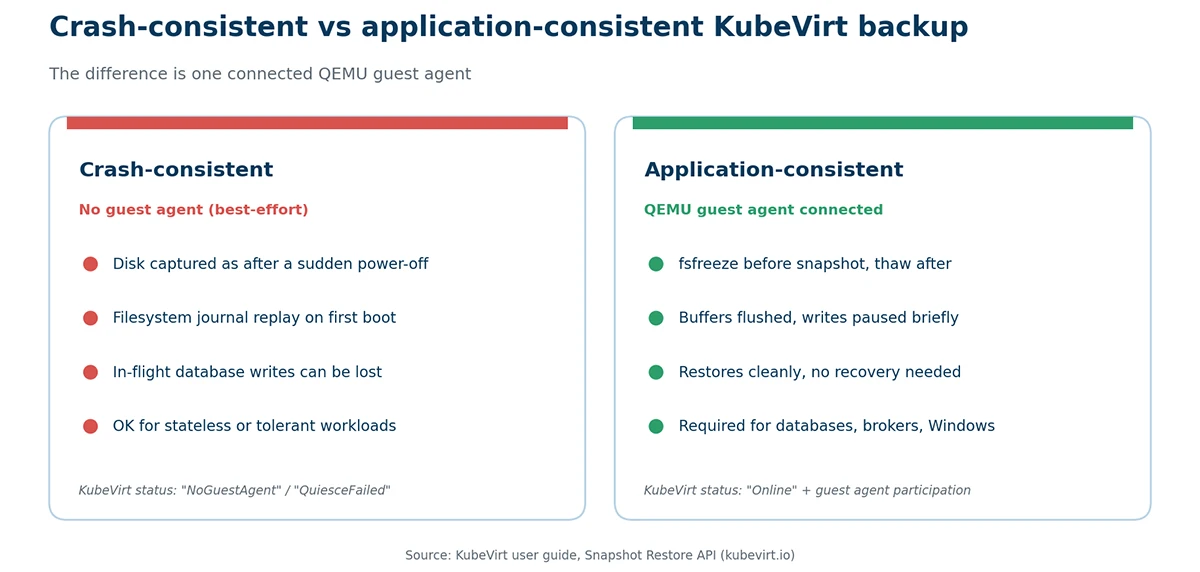
Figure 3. Crash-consistent vs application-consistent KubeVirt backup
KubeVirt records which level you got: without a connected agent, the snapshot is marked best-effort (crash-consistent), and a failed freeze is flagged with a QuiesceFailed indication. For databases, message brokers, and Windows workloads, treat the VM’s AgentConnected condition as a backup prerequisite.
One rule carries over unchanged from VMware: a snapshot is not a backup. VolumeSnapshots live on the same storage as the source PVC. To survive storage failure or cluster loss, move the data to independent storage through Velero’s data mover, CDI’s VirtualMachineExport API, or a replication engine that streams changed blocks to another cluster or cloud.
KubeVirt vs OpenShift Virtualization: what is the difference?
KubeVirt is the upstream open-source project that adds virtual machine management to Kubernetes through custom resources; OpenShift Virtualization is Red Hat’s commercially supported distribution of KubeVirt, packaged as an operator on OpenShift. KubeVirt was started at Red Hat in 2017, joined the CNCF as a sandbox project in September 2019, moved to the incubating maturity level in April 2022 and completed its first third-party security audit in 2025 as part of its graduation application.
For backup purposes the two share the same APIs: VirtualMachine, VirtualMachineSnapshot, DataVolume and the CSI VolumeSnapshot integration behave identically. The differences are in defaults and support. OpenShift Virtualization ships VM templates with the QEMU guest agent preinstalled, enables the Snapshot feature gate, bundles the Migration Toolkit for Virtualization for moving VMs from vSphere, and provides OADP (OpenShift API for Data Protection), a supported Velero distribution with a KubeVirt plugin. On upstream KubeVirt, or distributions that embed it such as SUSE Harvester, you assemble the same pieces yourself. Everything below applies to both.
Hystax Acura replicates your VMware, KVM, and public cloud workloads to KubeVirt in the background and keeps protecting them after cutover with automated disaster recovery and backup. Leave your business email, and a Hystax expert will walk you through a personalized demo on your own infrastructure
Thank you for your request!
We will be in touch soon.
KubeVirt backup methods compared
Four approaches cover most deployments. The table compares them on the criteria that decide whether a restore actually works.
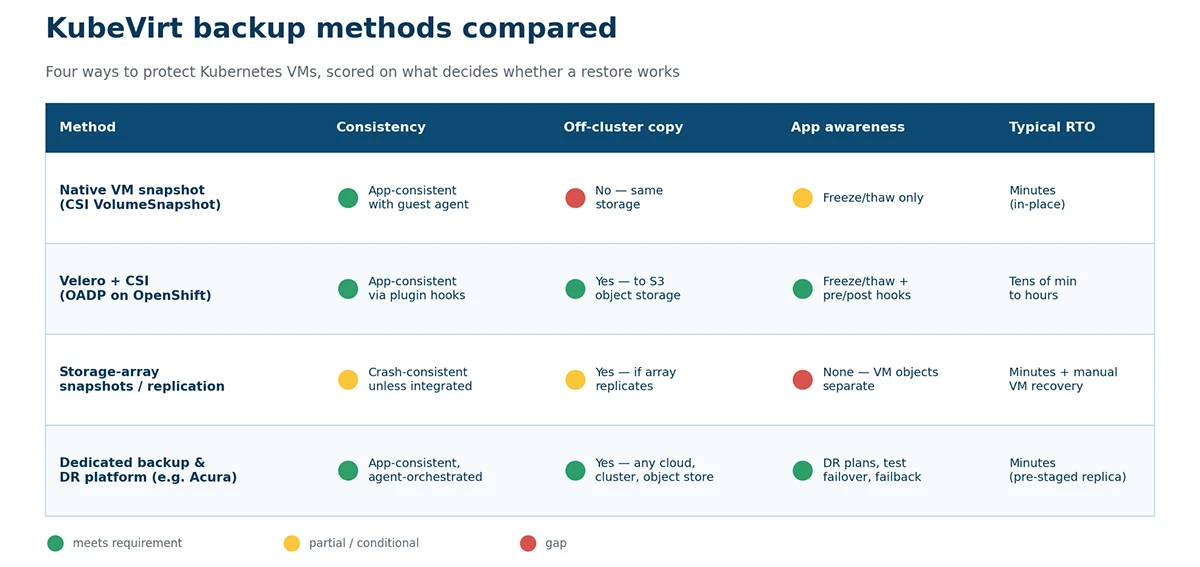
Figure 4. Four KubeVirt backup methods scored on consistency, off-cluster copy, application awareness and typical RTO
| Method | Consistency | Off-cluster copy | VM/application awareness | Typical RTO | Best for |
|---|---|---|---|---|---|
| Native VM snapshot (CSI VolumeSnapshot) | Application-consistent with guest agent; otherwise crash-consistent | No, snapshot stays on the same storage | Freeze/thaw only; captures VM spec + PVCs | Minutes for in-place rollback | Checkpoints before patching or upgrades |
| Velero + CSI (OADP on OpenShift) | Same as native via KubeVirt plugin hooks | Yes, data mover copies to S3-compatible object storage | Freeze/thaw plus pre/post hooks; whole namespaces | Tens of minutes to hours; data is rehydrated from object storage | Scheduled backup of VMs and their Kubernetes dependencies |
| Storage-array snapshots / replication | Crash-consistent unless integrated with the guest agent | Yes, if the array replicates to a second site | None; VM objects restored separately | Minutes for data, plus manual VM object recovery | Large estates standardized on one storage vendor |
| Dedicated backup & DR platform (e.g., Hystax Acura) | Application-consistent, agent-orchestrated restore points | Yes, incremental block-level replication to any cloud, cluster or object storage | VM- and app-aware; DR plans, boot order, test failover, failback | Minutes, failover to a pre-staged replica | Cross-cloud DR, MSPs, mixed VMware and KubeVirt estates |
Rule of thumb: use native snapshots for short-lived checkpoints, Velero or OADP for scheduled backups that must leave the cluster, and a dedicated platform when the requirement is written in RPO and RTO minutes, or when one tool has to protect workloads still on VMware alongside those already on KubeVirt.
Disaster recovery for KubeVirt: RPO, RTO and failover
Recovery point objective (RPO) is the maximum data loss measured in time; recovery time objective (RTO) is the time between the incident and the restored service. Backup gives you restore points; disaster recovery gives you a runnable copy of the infrastructure elsewhere, plus the automation to bring it up in order. KubeVirt has three scenarios with different RPO/RTO profiles:
- Same-cluster snapshot restore. Protects against a bad change, a failed upgrade or ransomware inside the guest, not against losing the storage or the cluster.
- Cross-cluster restore from object storage. Velero or OADP restores VMs into a new cluster from S3. It survives cluster loss, but RTO runs to hours for terabyte-scale estates because every disk is rehydrated before the VM can boot.
- Continuous replication to a standby platform. Changed blocks are replicated in the background to a second KubeVirt or OpenShift Virtualization cluster, to OpenStack, or to a public cloud, and DR plans start the VMs in dependency order. RPO drops to minutes and RTO to the time it takes to boot the replicas.
Hystax Acura for KubeVirt implements the third scenario. It replicates KubeVirt VMs in the background with incremental, block-level restore points that are deduplicated and WAN-optimized, keeps them in block storage for DR or in object storage for long-term backup, generates DR plans automatically from the replicated infrastructure, and runs non-disruptive test failovers on demand. Failback returns the changes made at the DR site to production without data loss. The same engine performs live cloud migration from VMware, KVM, and public clouds into KubeVirt or Red Hat OpenShift Virtualization, so migration and protection become one workflow, closing the gap where coverage lapses during a VMware exit.
One term needs clarifying. KubeVirt’s own live migration moves a running VM between nodes of the same cluster for maintenance; it is an availability feature, not data protection, and creates no restore point. The live migration to KubeVirt that Hystax provides is a different operation: replicating a workload from another platform and cutting it over in a maintenance window that averages one to three minutes.
How to back up a KubeVirt VM: step-by-step
This procedure produces an application-consistent, off-cluster backup and proves it restores. It applies to upstream KubeVirt and OpenShift Virtualization alike.
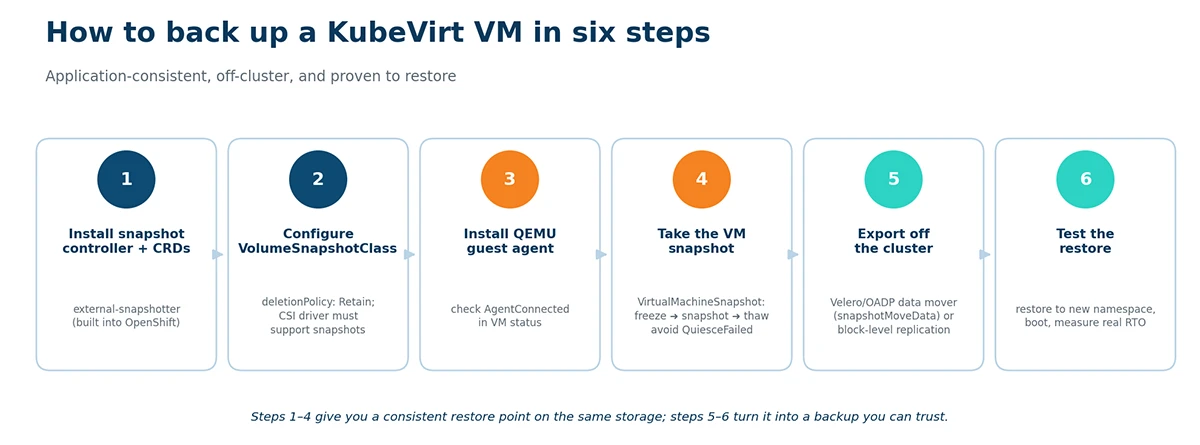
Figure 5. Six steps to an application-consistent, off-cluster KubeVirt VM backup.
- Install the snapshot controller and CRDs. Upstream Kubernetes needs the external-snapshotter components; OpenShift includes them. Verify with kubectl get crd volumesnapshotclasses.snapshot.storage.k8s.io.
- Configure a VolumeSnapshotClass. Create one for your CSI driver and set deletionPolicy: Retain for the class used by backups. Confirm the VM’s StorageClass supports snapshots; on OpenShift, the StorageProfile object shows this capability.
- Install the QEMU guest agent in every VM. Use the distribution package on Linux and the virtio-win guest tools on Windows, then confirm the AgentConnected condition in the VM status. Without it, you only get crash-consistent copies.
- Take the snapshot. Apply a VirtualMachineSnapshot referencing the VM, optionally with a failureDeadline. Read the status indications: you want Online with guest agent participation, not NoGuestAgent or QuiesceFailed.
- Export the data off the cluster. Run a Velero or OADP backup of the whole namespace with the CSI and KubeVirt plugins and snapshotMoveData: true, targeting external object storage, so VMs, DataVolumes, PVCs, Secrets, and network definitions travel together. Or let a replication engine stream changed blocks to a DR site.
- Test the restore. Restore into a separate namespace via namespace mapping, boot the VM, verify the application, and measure the real RTO. Repeat on a schedule; a backup that has never been restored is an assumption, not a plan.
Summary
KubeVirt and OpenShift Virtualization run virtual machines as Kubernetes pods, so a KubeVirt backup protects two layers at once: the VM’s Kubernetes objects and its PVC data, captured through CSI VolumeSnapshots with QEMU guest agent freeze/thaw for application consistency. A snapshot alone stays on the same storage and is not a backup; the copy has to leave the cluster through Velero/OADP or block-level replication, and disaster recovery with low RPO and RTO needs continuous replication to a standby platform with tested failover. For teams leaving VMware this is a redesign of data protection rather than a tool swap, and Hystax Acura covers both the migration to KubeVirt and the DR and backup that follow it.
Talk to a Hystax engineer about your RPO and RTO targets, storage layout and cross-cloud DR scenario. We will show how Hystax Acura tests failover without touching production, and what a realistic recovery plan for your OpenShift Virtualization estate looks like
Thank you for your request!
We will be in touch soon.
Frequently asked questions
Can I use Veeam or my existing vSphere backup tool for KubeVirt?
Not in its vSphere configuration: jobs built on VADP and VMDK access have no equivalent on KubeVirt. Several vendors have added KubeVirt support through the CSI snapshot API, so verify three things first: that the tool backs up the VirtualMachine resource and DataVolumes, not just PVCs; that it triggers freeze/thaw through the QEMU guest agent; and that it supports your CSI driver. Treat the move as a new backup design, not a re-pointed job.
Is a CSI snapshot enough to back up a KubeVirt VM?
No. A VolumeSnapshot is a restore point on the same storage as the source volume and covers only PVC data. A backup also needs the VM specification and related objects, and a copy on independent storage. Use snapshots for quick rollback and pair them with Velero, OADP or a replication platform for real protection.
What is the difference between crash-consistent and application-consistent KubeVirt backup?
A crash-consistent backup is the disk as it would be after an abrupt power-off; the guest may need filesystem and database recovery on boot. An application-consistent backup freezes guest filesystems and flushes buffers first, via the QEMU guest agent, so it restores cleanly. KubeVirt does this automatically when the agent is connected and falls back to crash-consistent when it is not.
How do I set up disaster recovery for KubeVirt with low RPO and RTO?
Replicate continuously instead of backing up nightly, keep replicas on a platform that can boot them immediately, and define DR plans that start VMs in dependency order with the right networks. Test failover regularly without touching production. Hystax Acura implements this model for KubeVirt and OpenShift Virtualization, with RPO and RTO in minutes and a failback path to production.
How do I translate my vSphere backup strategy to OpenShift Virtualization?
Map components, not products: VADP becomes the CSI VolumeSnapshot API; VMware Tools quiescing becomes QEMU guest agent freeze/thaw; backup proxies become Velero node agents or replication agents; Site Recovery Manager becomes DR plans; datastore retention becomes VolumeSnapshotClass and object storage lifecycle policies. Keep your existing RPO and RTO targets as acceptance criteria.
Can I back up or replicate KubeVirt VMs to a different cloud or another KubeVirt cluster?
Yes. Velero and OADP restore from object storage into any cluster with compatible storage, and replication platforms such as Hystax Acura support any-to-any scenarios: KubeVirt to another KubeVirt cluster, to OpenStack, or to AWS, Azure, and Google Cloud, and back.