




Table of contents
- What is data center migration?
- Types of data center migration
- Data center migration plan in 7 phases
- Data center migration checklist
- Data center migration strategy: choosing an approach
- Minimizing downtime: live replication vs cold cutover
- Timeline and cost factors
- Data center exit: decommissioning and contracts
- Data center migration best practices and common mistakes
- How Hystax Platform automates data center migration
Key takeaways
- With background replication, the only real pause is the final sync and restart.
- A data center migration plan runs through seven phases, from deciding what moves to closing the old site.
- Problems surface at cutover but start earlier: an unknown server, an application separated from its database, or a test never run.
- The old site keeps charging until you cancel leases, support contracts, and circuits, each with its own notice period.
What is data center migration?
Data center migration is transferring applications, data, and supporting infrastructure from one data center environment to another. The destination may be a public cloud, a private cloud, a colocation facility, or a consolidated site. In a network-based migration, workloads are replicated to the new platform and started there, so no hardware is transported.
A large share of that movement is now driven by the exit from VMware. Broadcom ends general support for vSphere 8.0 on October 11, 2027, and teams still on it need a new platform by that date.
Types of data center migration
Few projects fit a single type: one can consolidate two sites, move most workloads to a cloud, and leave a handful in place.
| Type | What moves | Typical driver | Main consideration |
|---|---|---|---|
| DC-to-cloud | On-premises workloads to a public cloud | Exit from owned hardware, elastic capacity | Bandwidth, cloud running costs, licensing |
| DC-to-DC | Workloads to another site, often a different hypervisor | Lease end, leaving a virtualization vendor | Drivers, networking, and boot settings differ between platforms |
| Consolidation | Workloads from several sites into fewer ones | Cost reduction, merger integration | Capacity planning, overlapping IP ranges |
| Hybrid | Part of the estate moves, the rest stays | Data residency, latency, specialized hardware | A stable link between sites for months or years |
The type changes what you check, not the order of the work.
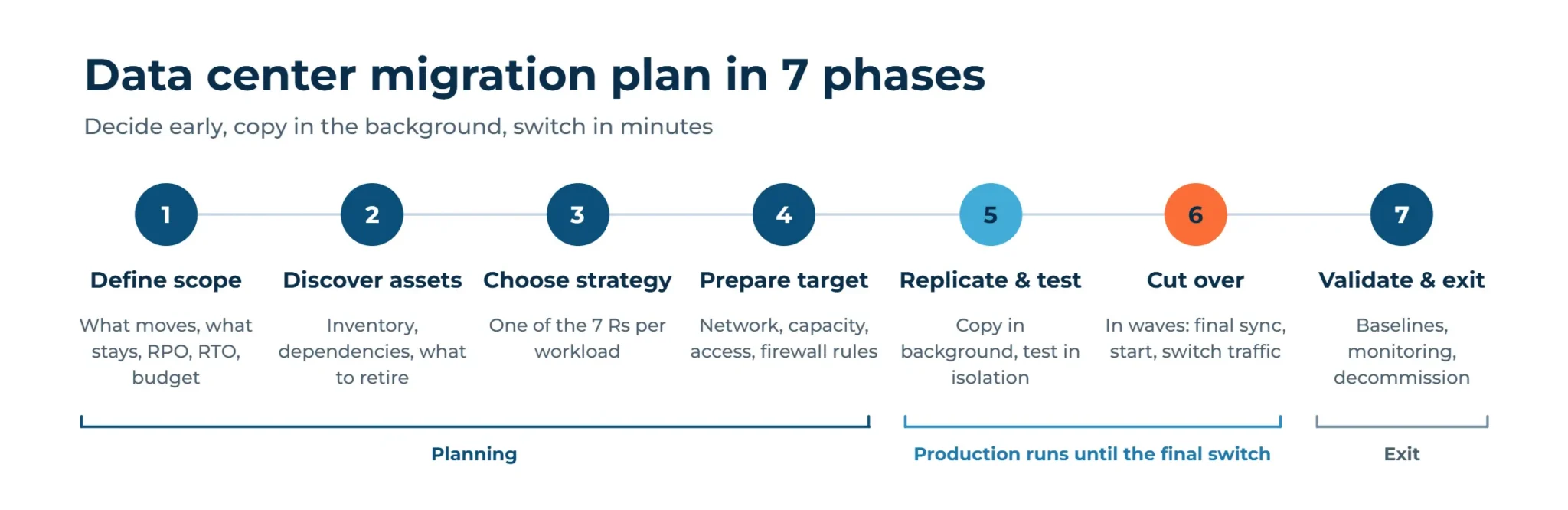
Data center migration plan in 7 phases
A data center migration plan turns a large project into a sequence of checkpoints.
1. Define scope and success criteria
The plan starts with a list of what is moving, what stays, and what gets retired. Success criteria include the cutover window, acceptable data loss (RPO), recovery time (RTO), and a budget ceiling.
2. Discover assets and map dependencies
3. Pick a strategy per workload
Each workload gets its own data center migration strategy, and the section below sets out the options.
4. Prepare the target environment
Networks, storage, identity services, security policies, capacity, and firewall rules between sites have to exist before the first replica arrives. Replication traffic needs an outbound path from the source network to wherever the migration tool runs.
5. Replicate and test
Background replication copies workloads to the target while production keeps running. Test migrations start copies in an isolated network to check boot, application behavior, and performance.
6. Cut over in waves
Workloads move in groups ordered by dependency and business risk. A single cutover runs a final replica, shuts down the source, starts the target, runs acceptance testing, and redirects traffic to the new site.
The source stays untouched until acceptance passes, which keeps a rollback path open. Once waves start, replication and cutover overlap: later groups are still copying while the first ones switch over.
7. Validate, optimize, and decommission
After acceptance, teams compare performance with baselines, resize resources, update monitoring and backup jobs, and retire the old environment. Contracts and data sanitization have their own section below.
Data center migration checklist
The table below turns the data center migration plan into checks that fit a ticketing system or a spreadsheet.
| Phase | Checks | Done when |
|---|---|---|
| 1. Scope | Workloads to move, retain, and retire listed; RPO, RTO, cutover window, and budget set | Signed-off inventory and written targets |
| 2. Discovery | Inventory of servers, storage, and network paths; dependency mapping per application; unsupported configurations flagged | Machine groups defined per wave, exceptions list with an owner per item |
| 3. Strategy | Rehost, replatform, retire, or retain assigned per workload | Every workload has a strategy |
| 4. Target | Network, firewall rules, IP plan, compute, storage, identity, and security policies in place; source workloads backed up and a restore tested | Connectivity test passed, capacity covers peak load, restore test log |
| 5. Replicate and test | Agents or appliances deployed, initial replication finished, test migration run per application group | All machines synced, test report with issues closed |
| 6. Cutover | Maintenance window approved and users informed, final replica, startup at target, acceptance testing, traffic redirected to the new site | Sign-off from application owners |
| 7. Validate and exit | Monitoring, backup, and DR running at the new site; contracts closed, drives sanitized | Alerts and jobs active, decommission record |
Data center migration strategy: choosing an approach
AWS Prescriptive Guidance for large migrations, meaning moves of 300 or more servers, defines seven strategies, known as the 7 Rs. Rehost, replatform, relocate, and retire are common choices at scale, and it advises against refactoring during the move as the most complex path.
| Strategy | What happens | Fits when |
|---|---|---|
| Retire | The application is shut down | No business value, or no inbound connections for 90 days |
| Retain | The application stays at the source | Data residency, special hardware, a recent upgrade |
| Rehost | The application moves as-is (lift and shift) | Large volumes and tight deadlines |
| Relocate | A move to the cloud version of the same platform | Source and target run the same stack |
| Replatform | The application moves with some optimization | Database replatforming or a newer OS is planned |
| Repurchas | The application is replaced with a SaaS product | A vendor alternative exists |
| Refactor | The application is rebuilt for the targe | A strong business case; usually after the move |
The choice of data center migration strategy also determines how much work a tool can take on. Rehost and relocate run end to end on replication. Replatform, repurchase, and refactor need application work on top, so they usually follow the move as separate projects.
Minimizing downtime: live replication vs cold cutover
Downtime depends on how data reaches the target. A cold cutover stops the application, copies the data, and starts it at the new site, so the outage lasts as long as the copy. Live replication runs in the background, and the outage shrinks to the final switch. The choice matters most where no maintenance window is long enough to copy the data offline.
| Aspect | Cold cutover | Live replication |
|---|---|---|
| Application during the copy | Stopped | Running |
| Outage length | Grows with data volume | Final sync and restart |
| Testing before the switch | Limited | Repeated test launches from replicas |
| Retry after rollback | The outage and the full copy happen again | Replication resumes where it stopped, so a retry needs only another short switch |
| Best fit | Small, non-critical systems | Large or business-critical estates |
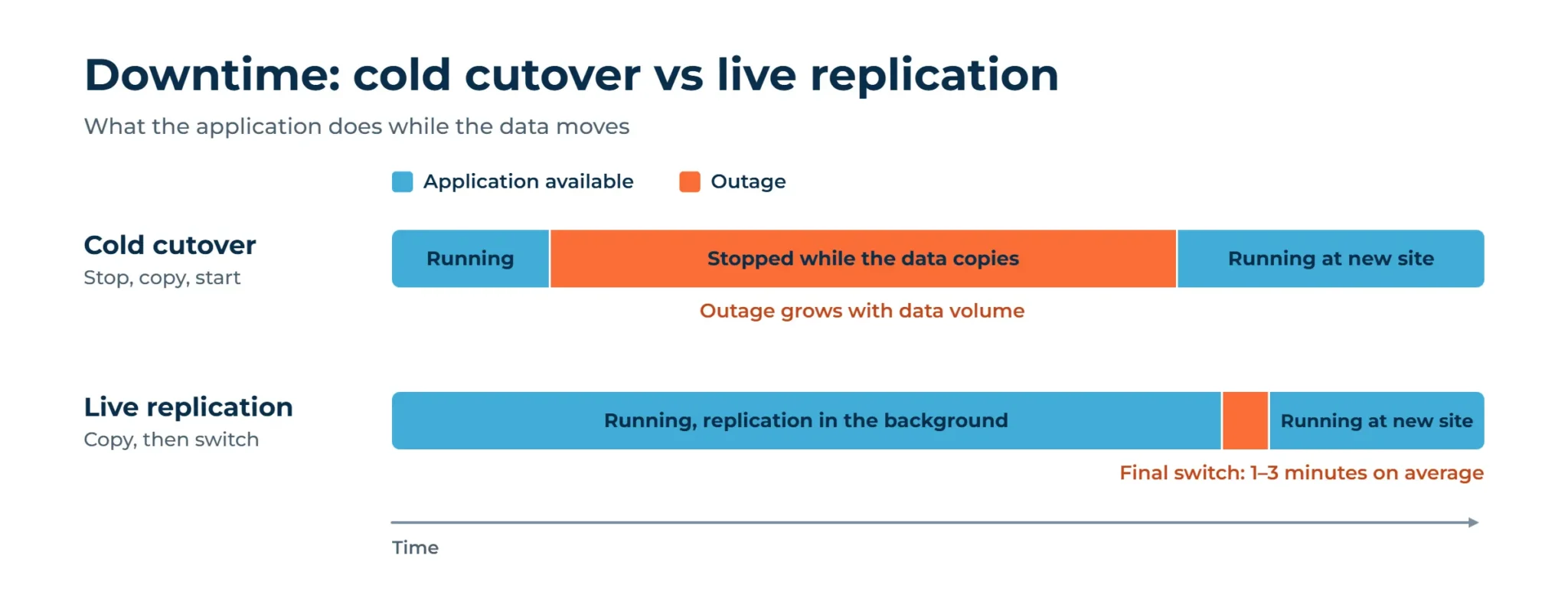
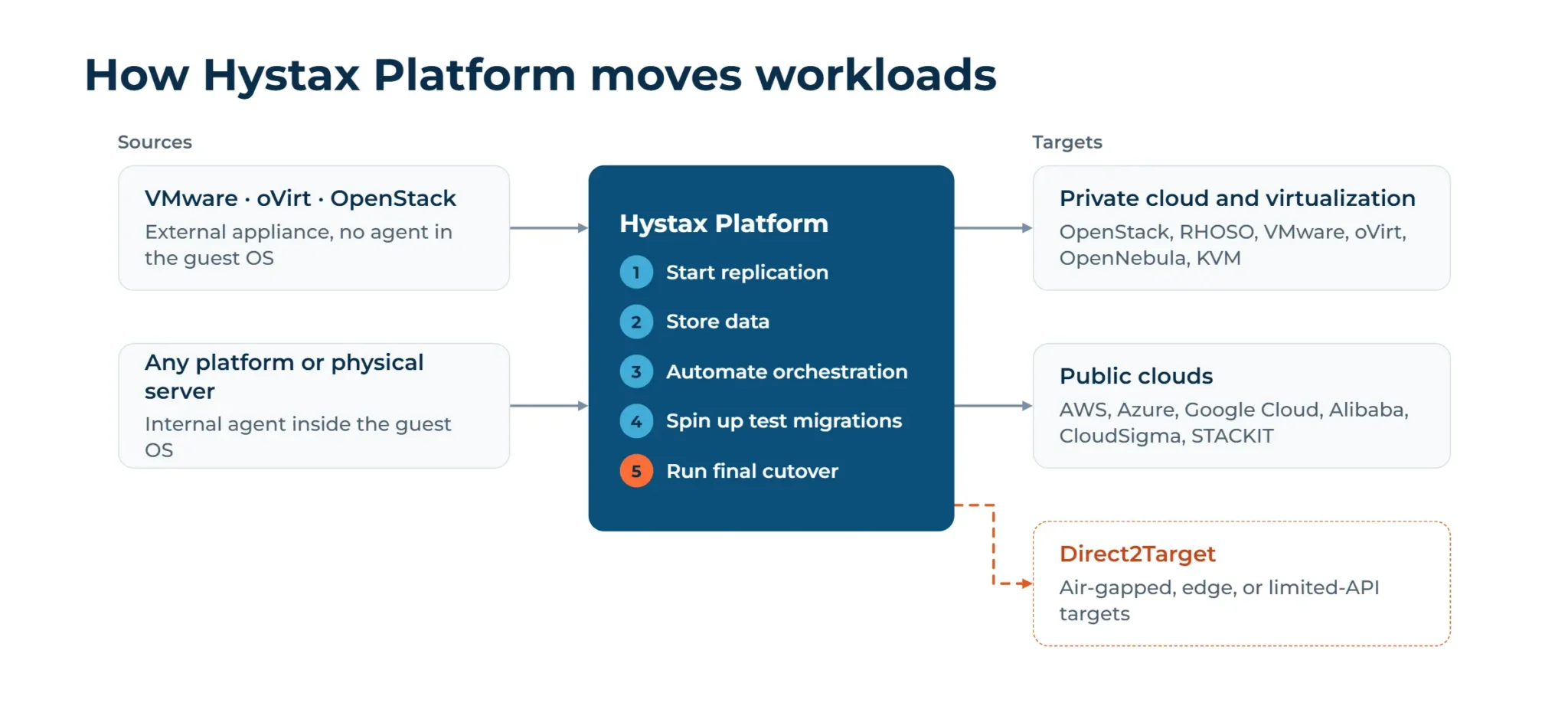
How short that final switch gets depends on the tool. Hystax Platform works in five stages: start replication, store data on the target, automate orchestration, spin up test migrations, and run the final cutover, which averages 1 to 3 minutes. Results depend on the workload and the target.
Timeline and cost factors
A few key factors determine how long a migration takes and what it costs.
| Factor | Effect on timeline | Effect on cost |
|---|---|---|
| Number and size of VMs | Longer initial replication | More target storage and bandwidth |
| Data change rate | Larger final sync | Longer parallel run of both sites |
| Bandwidth between sites | Sets the speed of the first copy | Link upgrades or temporary circuits |
| Dependency complexity | More waves to coordinate | More project hours |
| Licensing | Review time per target | Licenses that don’t move as-is: RHEL rehosted to AWS arrives as BYOL, so it needs eligible Red Hat subscriptions or a switch to AWS license-included pricing |
| Migration tooling | The migration tool has to be deployed before replication starts | Compute sized to how many machines replicate at once |
Data center exit: decommissioning and contracts
Closing the old site is the last phase, and much of it is contract work: lease or colocation notice periods, hardware support, network circuits, and licenses tied to old hardware. Notice periods can be long, so check them during planning, not after cutover. Once the workloads are gone, shut down applications marked for retirement during discovery, wipe or destroy drives, and archive sanitization certificates and asset records.
Tell us what you run today, and we will map the route.
Thank you for your request!
We will be in touch soon.
Data center migration best practices and common mistakes
The rows below are what the phases above look like when one of them is rushed.
| Mistake | What happens | Best practice |
|---|---|---|
| Incomplete inventory | Forgotten servers surface after the old site shuts down | Discovery data cross-checked against network traffic and monitoring |
| Missing dependencies | An application moves without its database | Dependency groups fixed before the wave plan |
| Skipped test migrations | Boot and driver problems appear at cutover | Repeated test launches in an isolated network |
| One big-bang cutover | A single failure hits the whole estate | Waves with a defined rollback path |
| Licensing overlooked | Unexpected fees or non-compliant instances | A license review per target platform |
| Network capacity underestimated | Replication lags and windows slip | Early bandwidth tests, with compression and deduplication |
| Early decommissioning | No fallback when an issue appears late | A read-only source kept for an agreed period |
How Hystax Platform automates data center migration
Hystax Platform combines three products: Hystax Migration, Hystax Disaster Recovery, and Hystax Backup. Migration moves workloads between data centers and clouds in a lift-and-shift pattern: initial replication, incremental replicas, test launches, and a final cutover.
Sources include VMware, OpenStack, and oVirt at the platform level, plus any other platform or physical server at the machine level.
Targets are split into two groups. Private cloud and virtualization platforms include OpenStack, Red Hat OpenStack Services on OpenShift, VMware, oVirt, OpenNebula, Virtuozzo, Apache CloudStack, KubeVirt, Red Hat OpenShift Virtualization, Oracle Linux KVM, and Oracle Linux Virtualization Manager. Public clouds include AWS, Microsoft Azure, Google Cloud, Alibaba Cloud, CloudSigma, and STACKIT as a sovereign European option.
Replication can run in two ways. An internal agent installs inside the guest OS and covers any virtualization platform or physical server. For VMware, oVirt, and OpenStack sources, an external appliance does the same without an agent in every guest OS. On VMware, it reads disks through Broadcom’s VDDK library, which is no longer available for public download. The internal agent does not need it.
A Direct2Target option sends replicated data straight to target disks through a dedicated agent, with no call to the target platform’s API. Any environment with disk-level write access can act as a target, which covers platforms with limited API exposure, air-gapped infrastructure, and edge sites.
Three customer cases show the software at scale:
- A global payroll enterprise moved from VMware to Red Hat OpenStack Services on OpenShift: 500 VMs in the first phase, then 4,500+ across a two-year program. In a September 2026 blog post, Red Hat reported 9,000 Windows and Linux VMs in the program, including workloads from a legacy OpenStack cloud. Afterward, they needed an alternative to VMware Site Recovery Manager, so the work grew into a disaster recovery proof of concept.
- CompuGroup Medical migrated 5,000+ VMs between OpenStack-based platforms within a few months, using a deployment that runs inside the customer environment without internet access.
- A global cybersecurity provider has moved thousands of VMs from VMware to RHOSO, out of more than 10,000 planned, with final cutovers completed within minutes.
Once workloads run in the new data center, disaster recovery and backup can protect them there, and the 3-2-1 backup rule describes how many copies to keep.
Leave your business email and a Hystax engineer will walk you through a test migration.
Thank you for your request!
We will be in touch soon.
Frequently asked questions
How long does a data center migration take?
The duration depends on data volume, bandwidth, dependencies, and testing depth. Hystax customer projects have run from a few months to about two years, depending on scope.
What is the difference between data center migration and cloud migration?
The two overlap: moving from an on-premises data center to a public cloud is both. Cloud migration also covers moves between clouds. Data center migration extends to moves between sites, data center consolidation, and hybrid setups.
Can a data center migration be done with minimal downtime?
Live replication keeps applications running during the copy, so the outage is limited to the final switch. In Hystax Platform, the average cutover takes 1 to 3 minutes. That is an average, not a guarantee.
Does the migration software support physical servers?
Yes. In Hystax Platform, physical servers replicate through internal agents for Windows and Linux. Two limits to keep in mind: P2V migration does not convert BIOS to UEFI, so a BIOS machine needs a target that supports BIOS boot. The Linux agent also does not run on systems with Secure Boot enabled.
What happens to the old data center after migration?
It stays intact for an agreed period as a fallback, then it is decommissioned: contracts are closed, drives are sanitized, and records are archived, as described in Data center exit.
How much does a data center migration cost?
No single figure applies. It depends on VM count, data change rate, bandwidth, test environments, licensing, and how long both sites run in parallel.