




Table of contents
Enterprise virtualization is going through a period of reassessment, and KVM virtualization has become one of the technologies organizations evaluate most often. Virtual machines remain essential for databases, business-critical applications, Windows workloads, legacy systems, and regulated environments. Yet many organizations are re-examining whether their existing virtualization platforms still provide the right balance of cost, flexibility, support, and long-term control.
Changes in the VMware market have accelerated this shift. A January 2026 CloudBolt survey of 302 IT decision-makers at North American enterprises with more than 1,000 employees found that 86% were actively reducing their VMware footprint, while only 4% had completed a full migration away from VMware. In other words, most enterprises are not replacing their virtualization infrastructure overnight. They are gradually moving selected workloads, testing alternative platforms, and reducing dependencies.
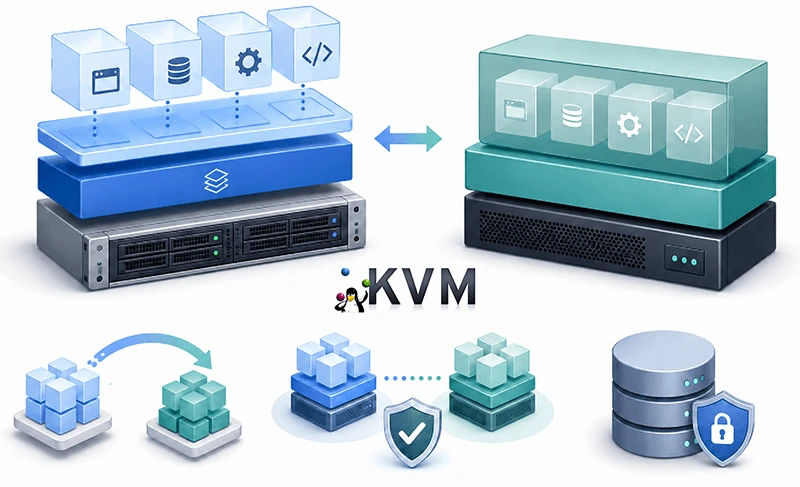
It is important to understand what KVM actually is in this context. KVM is not a single packaged alternative to VMware. It is an open-source virtualization foundation used by platforms such as OpenStack, OpenShift Virtualization, KubeVirt, OpenNebula, oVirt, Proxmox VE, and Nutanix AHV.
What Is KVM Virtualization?
To answer “What is KVM?”, it is useful to start with the full name: Kernel-based Virtual Machine. KVM is an open-source virtualization technology built into the Linux kernel. It enables a physical Linux server to run multiple isolated virtual machines, each with its own operating system, virtual processors, memory, storage, and network interfaces.
The practical answer to “what is KVM virtualization?” is that KVM turns Linux into a virtualization host. On x86 systems, it uses hardware virtualization extensions such as Intel VT-x or AMD-V to execute guest operating systems efficiently on the physical processor. The core technology includes the kvm.ko kernel module and processor-specific modules such as kvm-intel.ko and kvm-amd.ko.
KVM is often called a hypervisor, but it normally operates as part of a broader technology stack:
- KVM provides hardware-assisted CPU and memory virtualization.
- QEMU creates the virtual machine and supplies virtual hardware.
- libvirt provides a management and communication layer.
- An enterprise platform adds features such as clustering, high availability, software-defined networking, storage management, monitoring, access control, and automation.
This distinction matters. The KVM hypervisor is the underlying virtualization layer, while products such as OpenStack or OpenShift Virtualization provide the complete operating environment used by administrators.
KVM itself is therefore not a complete server virtualization software platform, unlike the VMware vSphere suite. Instead, it is the virtualization engine around which different open-source and commercial platforms are built.
Why Has KVM Become So Popular?
KVM has been part of the mainline Linux kernel since 2007 and benefits from the wider Linux development and security ecosystem. Interest in KVM virtualization has grown sharply as organizations look for more flexible and open alternatives, and its current momentum is driven by several factors:
- Organizations want more flexibility in how they license, deploy, and support virtualization.
- KVM is available through multiple enterprise platforms rather than a single vendor ecosystem.
- It can support traditional virtualized data centers, private clouds, edge environments, and Kubernetes-managed VMs.
- Enterprises can choose commercial support without giving one vendor exclusive control over the underlying hypervisor.
- KVM-based platforms can run both Linux and Windows virtual machines.
For companies already operating Linux infrastructure, Linux virtualization based on KVM can also fit neatly into existing administration, security, automation, and monitoring practices. In Red Hat environments, RHEL KVM combines KVM with QEMU and libvirt, while other Red Hat products extend this foundation to private cloud and Kubernetes deployments.
How Does KVM Virtualization Work?
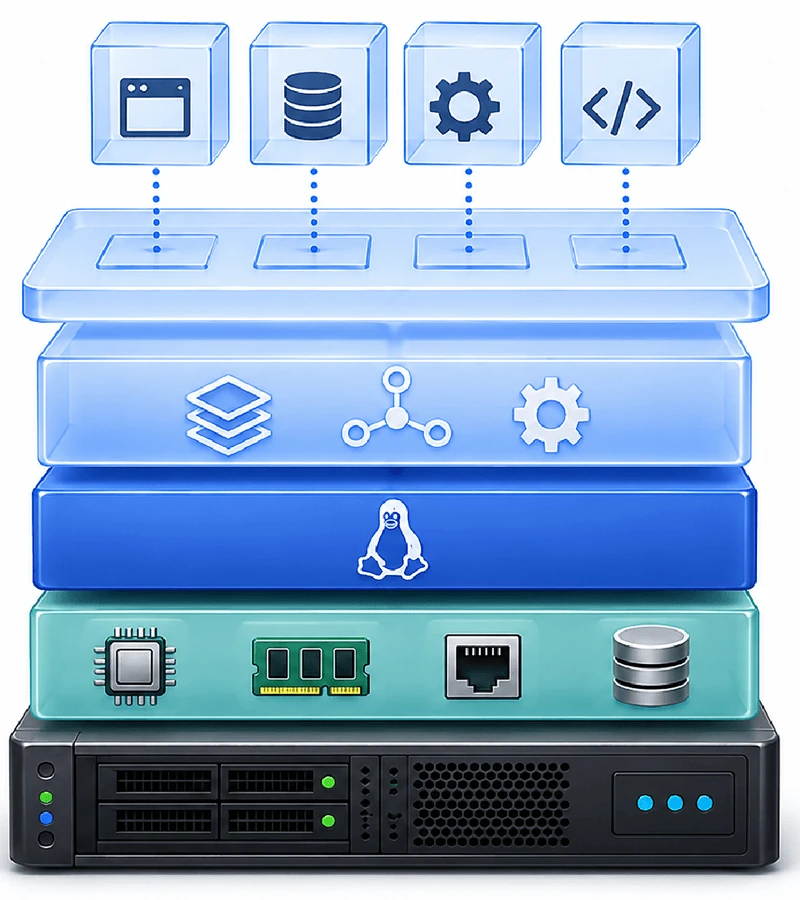
KVM virtualization runs as a set of layers rather than a single product. A typical KVM environment contains four main layers:
- Physical hardware with virtualization support.
- A Linux operating system with the KVM kernel modules enabled.
- QEMU and libvirt for VM creation and management.
- A higher-level platform for enterprise operations.
When an administrator creates a virtual machine, the management platform sends the configuration through libvirt. The configuration defines the VM’s virtual processors, memory, disks, network interfaces, firmware, and other devices.
libvirt passes the relevant instructions to QEMU. QEMU builds the virtual hardware model, while KVM uses the processor’s hardware virtualization extensions to run guest instructions directly on the physical CPU wherever possible. Red Hat describes libvirt as the management layer that communicates instructions to QEMU, which then works with KVM to allocate and use the required host resources.
Each virtual machine runs as a user-space process on the Linux host. Its virtual CPUs are represented as threads that the Linux scheduler assigns to physical CPU resources, and the Linux kernel handles memory allocation and other host-level resource management.
From inside the VM, the guest operating system sees an independent computer. It does not share an operating system with the other VMs and can run a different Linux distribution or a supported version of Windows.
The Role of Virtio Drivers in KVM
KVM environments commonly use Virtio for virtual storage and networking devices. Instead of fully emulating a physical disk controller or network card, Virtio provides an interface designed specifically for virtual machines.
This reduces emulation overhead and can improve storage and network performance, but the guest operating system must contain the appropriate Virtio drivers. That requirement is especially important when moving Windows workloads from VMware or another hypervisor to KVM: if the required storage driver is missing, the migrated VM may be unable to access its system disk or boot correctly.
Is KVM a Type 1 or Type 2 Hypervisor?
KVM is generally classified as a Type 1 hypervisor because its virtualization capability operates directly within the Linux kernel and uses hardware virtualization.
In practice, the complete architecture also includes user-space components such as QEMU and libvirt, so KVM blurs the traditional Type 1/Type 2 line. The most accurate answer to what KVM hypervisor technology is that KVM turns the Linux kernel itself into a hypervisor, while QEMU, libvirt, and the chosen management platform provide the surrounding VM functionality.
KVM vs VMware: Enterprise Comparison
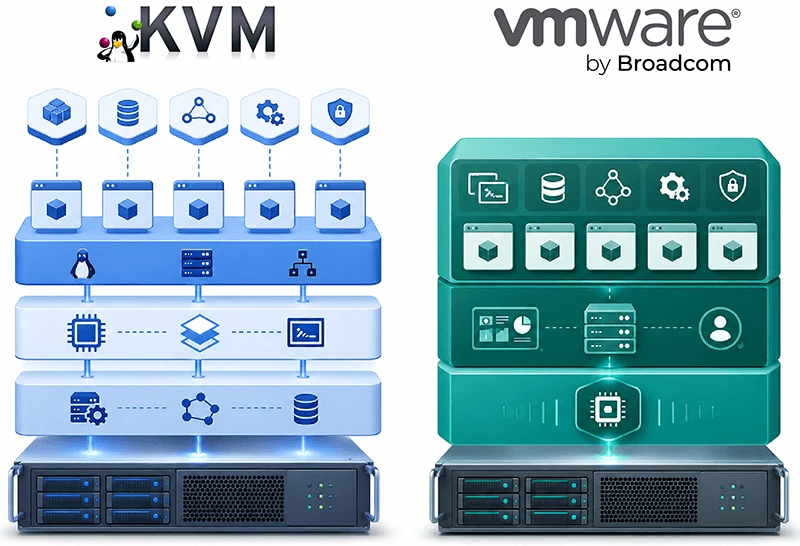
A useful VMware vs KVM comparison should examine complete platforms rather than comparing ESXi only with the KVM kernel module. VMware vSphere is an integrated commercial virtualization platform, whereas KVM serves as the foundation for several other platforms.
| Area | KVM-Based Platforms | VMware vSphere |
|---|---|---|
| Core technology | Open-source KVM technology integrated into the Linux kernel | Proprietary VMware ESXi hypervisor |
| Platform model | Multiple platforms and vendors, including OpenStack, OpenShift Virtualization, OpenNebula, oVirt, Proxmox VE, and Nutanix AHV | Integrated VMware ecosystem centered on ESXi, vCenter, and VMware Cloud Foundation |
| Licensing | KVM is open source; costs depend on the management platform, support subscription, hardware, and operations | Commercial subscription licensing based on physical CPU cores |
| Management | Depends on the selected KVM-based platform | Centralized management through VMware tools such as vCenter |
| Deployment options | Traditional virtualization, private cloud, hyperconverged infrastructure, edge, and Kubernetes-based virtualization | Enterprise virtualization, private cloud, hybrid cloud, and related VMware infrastructure services |
| Vendor choice | Multiple distributions, vendors, support providers, and integrators | Primarily controlled through the VMware by Broadcom product and partner ecosystem. |
| Operational skills | Requires Linux and platform-specific storage, networking, and automation expertise | Requires VMware-specific administration and architecture expertise |
| Migration considerations | Disk conversion, Virtio drivers, network mapping, firmware, and platform integration may be required | Established tooling for migrations within the VMware ecosystem |
| Best suited for | Organizations prioritizing platform choice, open infrastructure, private cloud, or VM and Kubernetes convergence | Organizations prioritizing a mature integrated stack and existing VMware operational processes |
Get an expert read on your specific environment.
Talk to a Hystax solutions architect about workload compatibility, migration complexity, and DR requirements – and get a realistic view of effort, risk, and timeline before you commit to a direction.
Thank you for your request!
We will be in touch soon.
The current KVM vs VMware decision should not be reduced to “free versus paid.” KVM itself is open source, but a production platform still requires hardware, storage, networking, monitoring, support, skilled engineers, backup, disaster recovery, and lifecycle management.
On the VMware side, VMware Cloud Foundation and VMware vSphere Foundation are now sold on a per-core basis, with a minimum of 16 licensed cores per physical CPU and, for new orders since April 2025, a 72-core minimum per license instance. This licensing model is one of the factors organizations now weigh in their virtualization cost assessments.
Why Are Enterprises Moving from VMware to KVM Platforms?
The first reason is greater licensing and commercial flexibility. Enterprises can choose between community-supported products, commercial Linux subscriptions, managed services, hyperconverged platforms, and private cloud solutions. This does not eliminate costs, but it provides more control over where those costs arise.
The second reason is reduced dependence on one virtualization vendor. Because KVM is an open technology supported by multiple platforms, organizations can select an operating model that best fits their requirements rather than being limited to a single product portfolio.
A third reason is infrastructure modernization. KubeVirt and OpenShift Virtualization allow organizations to manage virtual machines as Kubernetes resources and run them alongside containers. This does not automatically convert traditional applications into cloud-native applications, but it can create a shared operational platform for VMs and containers.
A fourth reason, particularly in Europe, is digital sovereignty. Public-sector bodies and regulated industries increasingly require infrastructure they can operate under European jurisdiction, and the sovereign platforms serving that demand – including OVHcloud, Open Telekom Cloud, STACKIT, and Germany’s Sovereign Cloud Stack – are built on OpenStack with KVM. The EU Data Act, applicable since September 2025, reinforces this by granting customers enforceable rights to switch providers, which favors open and portable virtualization layers.
Cost, however, is not the only consideration. Enterprises must evaluate application compatibility, storage performance, networking, security, support, team skills, backup integrations, and migration complexity. The CloudBolt survey shows why most organizations are taking a phased approach instead of attempting an immediate full replacement.
Learn more about how Broadcom’s licensing changes have led enterprises to reassess their VMware strategies →
KVM-Based Platforms for Enterprise Virtualization
Red Hat Enterprise Linux with KVM
RHEL can operate as a virtualization host using KVM, QEMU, and libvirt. This RHEL KVM configuration suits organizations that need supported KVM virtualization directly on Linux without deploying a full private cloud or Kubernetes platform.
Red Hat also uses KVM as the foundation for broader products, including OpenStack and OpenShift Virtualization.
OpenStack
OpenStack is an open-source cloud infrastructure platform used to build private and public clouds. Its Nova compute service supports multiple virtualization drivers, but most Nova deployments use libvirt with KVM.
OpenStack is designed for API-driven, multi-tenant infrastructure and can combine compute, software-defined networking, block storage, object storage, identity management, and self-service provisioning. It offers considerable architectural control, but requires expertise to deploy, integrate, and operate.
oVirt
oVirt is an open-source distributed virtualization management platform built around KVM, libvirt, Ansible, and related community technologies. It provides centralized management for hosts, clusters, virtual machines, storage, and networks.
The project is community-maintained: oVirt 4.5.7 was released in January 2026, its first release in about two years after Red Hat shifted its focus to OpenShift. Enterprises considering oVirt should evaluate the available commercial support, integrations, in-house skills, and long-term operating model their environment will require.
KubeVirt and Red Hat OpenShift Virtualization
KubeVirt extends Kubernetes with resources and controllers to run and manage virtual machines. VMs can be created, scheduled, monitored, and managed through Kubernetes APIs, enabling organizations to run traditional virtualized workloads alongside containerized applications.
Red Hat OpenShift Virtualization provides a commercially supported implementation within Red Hat OpenShift. It is intended for organizations that want to manage VMs and containers through common Kubernetes-based access controls, automation, networking, storage, and operational processes.
Red Hat OpenShift Virtualization provides a commercially supported implementation within Red Hat OpenShift. It is intended for organizations that want to manage VMs and containers through common Kubernetes-based access controls, automation, networking, storage, and operational processes.
The surrounding ecosystem is also expanding to support workload mobility and data protection for these environments. Hystax Acura supports migration, disaster recovery, and backup for workloads running on Red Hat OpenShift Virtualization, including migrations from VMware, public and private clouds, and physical infrastructure. Hystax Acura is also listed as a validated partner solution in the Red Hat Ecosystem Catalog.
Explore workload mobility and protection with Hystax Acura for Red Hat OpenShift Virtualization →
OpenNebula
OpenNebula is a cloud management platform for private, hybrid, and edge infrastructure. It supports KVM compute nodes and provides centralized control of hosts, virtual machines, images, networks, and storage. It is a good fit for organizations and service providers that need an integrated management layer for distributed or multi-tenant KVM environments without adopting the full OpenStack architecture.
Proxmox Virtual Environment
Proxmox VE combines KVM virtual machines and LXC containers in a single open-source server management platform. It includes an integrated web interface, clustering, high availability, software-defined storage, networking, backup functionality, and live migration. It is widely used for small and medium-sized environments, service providers, laboratories, branch deployments, and some enterprise use cases. Larger organizations should confirm that scalability, support, certification, security, and integration requirements are met before adoption.
Nutanix AHV
Nutanix AHV is a commercial virtualization platform based on KVM, QEMU, and related components. It is integrated into Nutanix Cloud Infrastructure and managed through the Nutanix Prism interface. AHV is designed for organizations that want a supported hyperconverged platform combining compute, distributed storage, availability, and virtualization management, rather than building a KVM environment from separate components.
Enterprise Use Cases for KVM-Based Platforms
Migration to KVM
KVM platforms can serve as target environments for workloads currently running on VMware, Hyper-V, bare-metal servers, public clouds, and other platforms.
A successful migration requires more than copying virtual disks. Teams may need to convert disk formats, install Virtio drivers, adjust BIOS or UEFI settings, configure network mappings, recreate security rules, verify application dependencies, and test storage and application performance. Replication and test migrations help identify these issues before the final cutover.
Disaster Recovery to KVM
A KVM-based platform can serve as a disaster recovery site for workloads running on KVM or on another source hypervisor.
A complete DR strategy must protect more than VM data. It should account for application consistency, network configuration, VM boot order, dependencies, recovery points, failover, failback, and regular testing. A replicated disk is not enough if the entire application cannot be started and accessed within the required recovery time.
Backup and Recovery for KVM Workloads
KVM workloads can be protected using storage snapshots, image-level backup, block-level replication, guest-aware backup, or dedicated data protection software.
Backup policies should define retention periods, encryption, off-site or isolated copies, immutable storage where appropriate, and regular restore testing. Storage snapshots alone should not be treated as a complete backup if they remain in the same storage system or failure domain as the production workload.
We'll walk through it on your own scenario.
Leave your business email, and a Hystax expert will walk you through agentless backup and disaster recovery for KVM, OpenStack, oVirt, OpenNebula, Virtuozzo, and KubeVirt – with tiered block and object storage and flexible retention policies.
Thank you for your request!
We will be in touch soon.
Migration, Disaster Recovery, and Backup with Hystax
Hystax Acura supports migration from VMware, Hyper-V, physical infrastructure, clouds, and other source environments to KVM and KVM-based platforms. The migration process includes background replication, migration plans, workload orchestration, test migrations, and a controlled final cutover.
For disaster recovery and backup, Hystax Acura supports KVM as a recovery environment and provides replication, recovery points, DR plans, application recovery orchestration, failover, and failback. This allows organizations to protect KVM workloads, or to use KVM as a recovery target for workloads running on another platform.
More information is available on the Hystax pages for live migration to KVM, as well as disaster recovery and backup for KVM.
Conclusion: Is KVM the Right Choice for Your Enterprise?
KVM is a mature virtualization technology and an important foundation for modern enterprise infrastructure. Its main advantage is not simply its open-source nature. It gives organizations a genuine choice of management platforms, support models, infrastructure architectures, and modernization paths.
Choosing KVM, however, is only the first step. Enterprises still need to select the right KVM-based platform, design the storage and network architecture, establish backup and disaster recovery processes, and plan the migration of existing workloads.
Or evaluating disaster recovery and backup options for your environment?
Share your requirements with the Hystax team, and we’ll help you assess the most suitable approach.
Thank you for your request!
We will be in touch soon.
For organizations seeking an alternative virtualization strategy, a private cloud foundation, or a unified environment for virtual machines and containers, KVM deserves careful evaluation. The best approach is usually a phased one: assess workloads, test the selected platform, validate operational readiness, and migrate in controlled stages.