




Table of contents
An immutable backup is a copy of data that cannot be altered, encrypted, or deleted for a set retention period – not by ransomware, not by a stolen account, and not by an administrator. For KVM and other virtual environments, this means VM restore points are written once to WORM (write-once-read-many) storage and stay readable but locked until the retention clock runs out. When production data is encrypted, a clean copy still exists that an attacker can’t touch.
This guide explains immutable backup meaning in practical terms, how immutability blocks ransomware, the difference between governance mode and compliance mode, and how to implement an immutable backup solution for KVM/QEMU-based platforms such as OpenStack, oVirt, OpenNebula, Proxmox VE, and KubeVirt.
What is an immutable backup?
An immutable backup is a backup written to storage that enforces a write-once-read-many (WORM) policy: once the data is committed, the storage layer rejects every overwrite and delete request until a predefined retention period expires. The key phrase is “storage layer” – immutability is not a checkbox inside the backup application but a property of where the restore point lives: object storage with Object Lock, a WORM-enabled appliance, or an air-gapped vault.
When the backup software finishes writing a restore point, the object receives a retain-until timestamp, set explicitly or inherited from the bucket’s default retention. From that moment, any call that modifies or deletes the object returns an error, while read and restore operations work normally.
A conventional backup is protected only by access control: whoever holds the credentials – or steals them – can delete it, overwrite it, or encrypt it in place. Backup encryption stops someone from reading the data; it does nothing to stop them from destroying it. Immutability adds a control that no credential can bypass during the retention window – the practical difference between “protected” and “immutable.”
How does immutability stop ransomware?
Ransomware groups rarely start by encrypting production data. They first locate backup servers, repositories, and cloud storage credentials, because a victim with usable backups has no reason to pay. Palo Alto Networks’ Unit 42 Global Incident Response Report 2026, based on more than 750 incident-response cases, found that attackers damaged backups in 26% of extortion cases, and that only 41% of victims were able to restore from backup without paying. The economics favor the attacker: the median initial demand rose to $1.5 million in 2025, and the median payment nearly doubled to $500,000. The Sophos State of Ransomware 2026 report shows the other side of the same coin – 66% of organizations whose data was encrypted recovered through backups, up 12 points year over year, yet the average recovery cost still climbed 11% to $1.7 million per incident. The window to notice an intrusion is short: Unit 42 puts the median time from initial access to data exfiltration at two days, and the fastest quartile at 72 minutes.
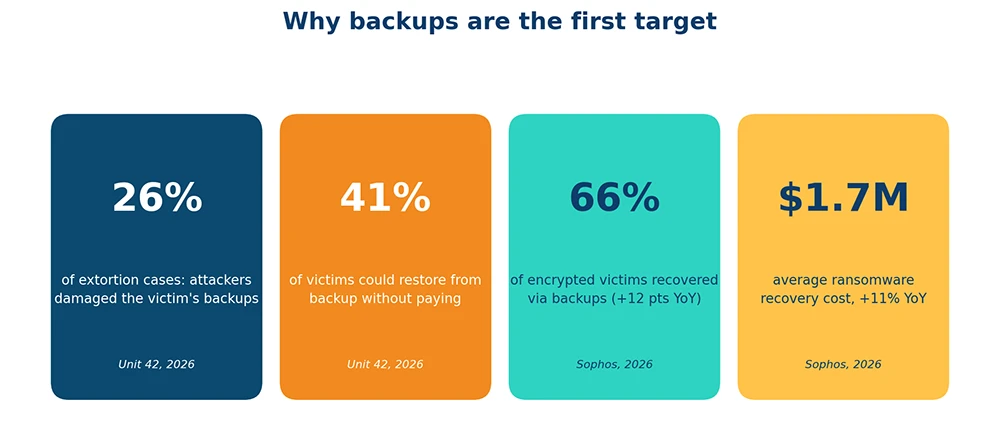
Figure 1. Why backups are the first target. Sources: Unit 42 Global Incident Response Report 2026; Sophos State of Ransomware 2026.
There are three ways to neutralize a backup, and immutability blocks all of them:
- Deletion – using stolen administrator credentials to remove the repository, bucket, or catalog. A delete request against a locked object is rejected regardless of who sends it.
- In-place encryption – encrypting backup files like any other disk. Encryption is an overwrite, and overwrites are rejected.
- Retention tampering – shortening the retention period so restore points age out before the intrusion is detected. In compliance mode, you can only extend retention.
Consider a KVM cluster running 200 virtual machines. An attacker phishes a domain administrator, reaches the backup server, and deletes the local backup catalog and the NFS repository behind it. Without immutability, the options are to pay the ransom or rebuild from scratch. If the same restore points were also copied to an object storage bucket with Object Lock and a 30-day retention period, every delete call against that bucket fails: the team provisions clean KVM hosts, restores the VMs from the locked restore points, and the ransom demand loses its leverage. Immutability does not prevent the intrusion – it removes the attacker’s bargaining chip.
The same logic covers insider threats and human error: a disgruntled administrator or a mistyped cleanup script cannot destroy what the storage refuses to delete. This is why CISA’s #StopRansomware Guide lists offline, encrypted, immutable backups among its baseline recommendations.
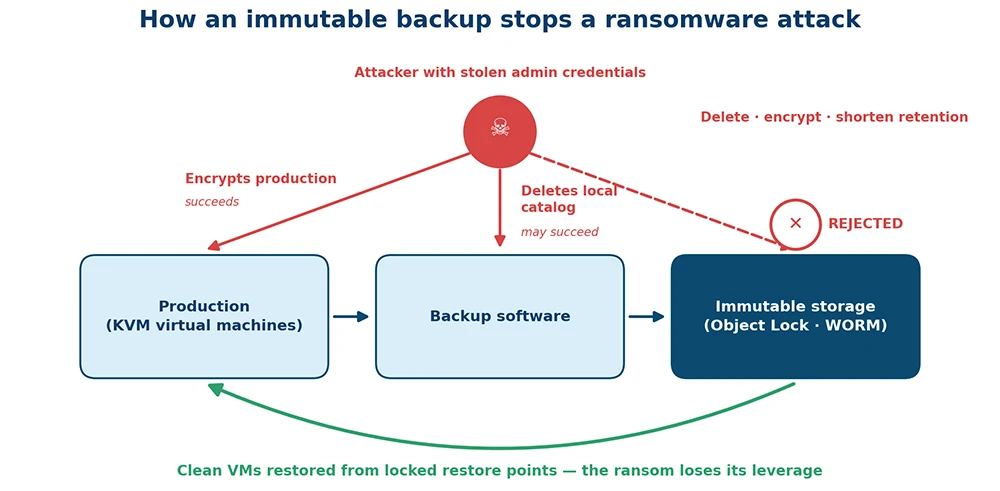
Figure 2. How an immutable backup stops a ransomware attack.
Book a live demo of Hystax Platform – background replication, migration plans, test migrations, and a controlled cutover, plus DR failover and failback.
Thank you for your request!
We will be in touch soon.
Immutability modes: governance vs compliance
Object storage platforms that support Object Lock — AWS S3, S3-compatible on-premises systems such as Ceph RGW and MinIO, and most cloud providers — offer two retention modes. The choice determines who, if anyone, can undo immutability before the retention period ends.
| Aspect | Governance mode | Compliance mode |
|---|---|---|
| Delete or overwrite before retention expires | Only users with the s3:BypassGovernanceRetention permission, and only with an explicit bypass header | No one, including the root user of the cloud account |
| Shorten the retention period | Yes, with bypass permission | No – retention can only be extended |
| Change the retention mode | Yes, governance can be upgraded to compliance | No |
| Stops an attacker holding admin credentials | Partial – fails if the compromised account has bypass permission | Yes |
| Best for | Testing retention policies; backups that need operational flexibility | Ransomware defense; regulated retention (finance, healthcare, public sector) |
| Main risk | Over-privileged accounts can defeat the lock | A wrong retention period cannot be undone; storage cost is committed |
A practical pattern is to validate retention settings in governance mode, then switch ransomware-critical restore points to compliance mode. Three rules apply to both modes on AWS Object Lock and most compatible implementations: Object Lock must be enabled when the bucket is created, it requires versioning, and lifecycle expiration rules do not remove locked object versions. A separate control, Legal Hold, blocks deletion indefinitely until it is explicitly removed. Source: Amazon S3 User Guide, Object Lock.
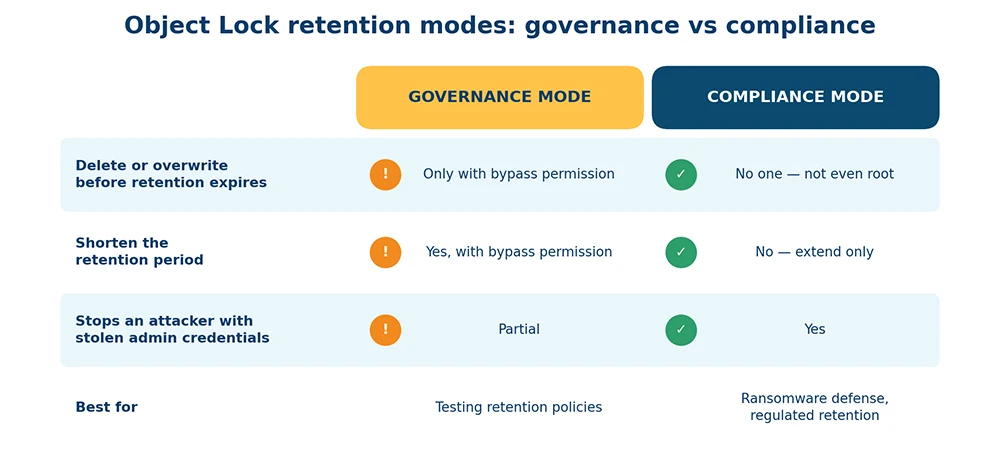
Figure 3. Governance mode vs compliance mode. Source: Amazon S3 User Guide.
Immutable backup for KVM/QEMU environments
KVM, libvirt, and the platforms built on them – OpenStack, oVirt, OpenNebula, Proxmox VE, Virtuozzo, KubeVirt, Red Hat OpenShift Virtualization – do not ship with native immutability. Hypervisor-level snapshots (qcow2, Ceph RBD, LVM) sit on the same storage as production data and share its exposure: an attacker with hypervisor or storage access removes both. Immutability has to be added at the backup target, and because it is a storage property rather than a hypervisor feature, the same architecture works for every KVM distribution.
A reference architecture for immutable KVM backup has four layers:
- Capture. An agentless or external replication agent reads VM disk data at the hypervisor level, tracks changed blocks, and produces application-consistent restore points without pausing the VM.
- Fast tier (block storage). Recent restore points stay on block storage in the target environment so a failed VM can be booted directly from a snapshot within minutes. This tier is optimized for RTO, not immutability.
- Immutable tier (object storage with Object Lock). Every restore point is copied to S3-compatible object storage with Object Lock in compliance mode and a retention period longer than your expected detection window – 14 to 30 days is a common starting point. This immutable cloud backup layer is ransomware-proof.
Air-gapped vault (optional). A periodic copy goes to a separate account, region, or provider – or to offline media – with no standing network path and separate credentials, protecting against a compromise of the primary storage platform itself.
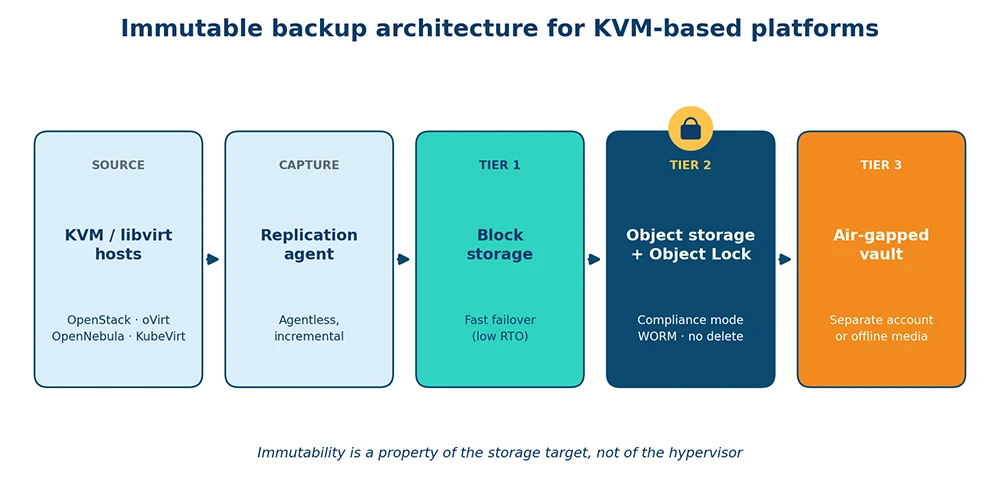
Figure 4. Reference architecture: immutable restore-point tier for KVM-based platforms.
This is the model Hystax Platform follows for KVM-based platforms: it keeps restore points in block storage for fast failover and in cost-effective object storage (S3-compatible, NFS, or Samba) for retention, with configurable snapshot retention policies, deduplication, and role-based access control with an audit trail. When you configure the object storage target with Object Lock, restore points written to it inherit the bucket’s retention lock, so the storage enforces immutability rather than the backup application. For the broader context, see why disaster recovery and backup are critical for KVM environments.
Immutable vs air-gapped vs 3-2-1: how they fit together
These are complementary controls, not alternatives. The 3-2-1 rule defines how many copies exist and where; an air gap defines network isolation; immutability defines whether a copy can be changed.
| Approach | Protects against | Does not protect against | Recovery speed | Relative cost |
|---|---|---|---|---|
| 3-2-1 rule (3 copies, 2 media types, 1 offsite) | Hardware failure, site loss, single-point deletion | An attacker with credentials to all copies | Fast (local copy) | Low–medium |
| Air gap backup (offline or network-isolated vault) | Network-borne attacks; credential theft (no online path) | Insiders with physical access; long RPO if copies are periodic | Slow (hours to days) | Medium–high |
| Immutable backup (Object Lock / WORM) | Deletion, encryption, and retention tampering — by anyone | The intrusion itself; data exfiltration; a retention period set too short | Fast (online and readable) | Low–medium |
| 3-2-1-1-0 (modern combination) | All of the above: one copy immutable or offline, zero restore errors | Untested restores | Fast | Medium |
The modern reading of the rule – 3-2-1-1-0 – keeps at least one copy immutable or offline and requires zero errors on restore verification. For copy counts, media types, and common mistakes, see the Hystax guide to the 3-2-1 backup strategy.
How to set up immutable backup: step-by-step
- Choose an Object Lock-capable storage target. AWS S3, Azure Blob immutable storage, Google Cloud Storage bucket lock, or S3-compatible on-premises platforms such as Ceph RGW, MinIO, or NetApp StorageGRID. Enable versioning and Object Lock at bucket creation – on AWS S3, it cannot be added afterward.
- Define the retention period. It must exceed the time you realistically need to detect an intrusion; 14–30 days is a practical baseline for operational restore points, and regulated archives may require 1–7 years. Start in governance mode and move to compliance mode once the policy is proven.
- Isolate credentials. The backup software should write with an identity that has PutObject rights but no DeleteObject or BypassGovernanceRetention permission. Keep the backup bucket in a separate cloud account from production, enforce MFA, and apply role-based access control inside the backup platform so no single operator can alter retention.
- Point the backup software at the immutable target. Schedule a copy job from the fast block-storage tier to the locked bucket to match your RPO. Keep backup encryption in transit and at rest – encryption and immutability protect different things.
- Add an air gap where the risk justifies it. A second copy to a different provider or region, or to offline media, covers a compromise of the primary storage platform or cloud account.
- Test restores from the immutable tier. At least monthly, restore a full VM into an isolated network directly from the locked restore points, verify application consistency, and record the actual RTO. This is the “0” in 3-2-1-1-0.
- Monitor and audit. Alert on failed backup jobs, rejected delete attempts against locked objects (CloudTrail or the equivalent audit log), retention changes, and newly granted bypass permissions. Review quarterly.
Summary
An immutable backup is the one copy of production data an attacker cannot delete, encrypt, or age out – the last line of defense against data loss, and what turns a ransomware incident from a negotiation into a restore job. For KVM and virtual environments, the implementation is well defined: capture consistent restore points at the hypervisor level, keep a fast copy in block storage for RTO, and copy every restore point to object storage with Object Lock in compliance mode – wrapped in the 3-2-1 rule, an air gap where budget allows, least-privilege credentials, and regular restore tests. Immutable backup software such as Hystax Platform supplies the capture, tiered storage, retention scheduling, and access control; the immutability itself is enforced by the storage layer – exactly where it belongs, because that is the one layer a compromised administrator account cannot reach.
Enter your business email, and our team will contact you shortly to discuss an immutable, ransomware-resilient backup architecture for your KVM or cloud infrastructure – retention design, object storage cost estimates, and a restore-testing plan.
Thank you for your request!
We will be in touch soon.
Frequently asked questions
Can ransomware delete immutable backups?
No. During the retention period, the storage layer rejects every delete and overwrite request, including requests made with valid administrator credentials, so ransomware cannot remove or encrypt a locked restore point. Exceptions include restore points whose retention has expired and governance-mode objects when the compromised account also holds the bypass permission – which is why compliance mode is recommended for ransomware defense.
Can an administrator override the retention lock?
It depends on the retention mode. In governance mode, an administrator with the s3:BypassGovernanceRetention permission can shorten retention or delete the object. In compliance mode, no user can – on AWS S3, not even the account root user; the only way to remove the data early is to close the entire AWS account.
What retention period should an immutable backup have?
Long enough to outlast the time an attacker could remain undetected in your environment. For operational restore points, 14–30 days is a common baseline; regulated data in finance, healthcare, or the public sector may require one to seven years. Because compliance-mode retention cannot be shortened, validate the policy in governance mode first.
Does immutable backup work for KVM and OpenStack?
Yes. Immutability is a property of the storage target, not of the hypervisor, so any KVM-based platform – OpenStack, oVirt, OpenNebula, Proxmox VE, Virtuozzo, KubeVirt – can use it as long as the backup software writes restore points to Object Lock-enabled object storage. Hystax Platform, for example, protects these platforms and stores restore points in S3-compatible object storage that can be configured with Object Lock.
Is immutability the same as an air gap?
No. An air-gapped backup is isolated from the network, so an attacker has no online path to reach it; an immutable backup stays online but cannot be modified or deleted. Immutable copies restore faster and can be verified continuously; air-gapped copies add protection if the storage platform itself is compromised. The strongest posture uses both.
Does immutable backup increase storage costs?
Moderately. Locked restore points cannot be deleted early, and lifecycle rules cannot purge them, so you are committed to the retention you set. Deduplication, keeping the immutable tier in object storage (cheaper than block storage), and cold storage classes for long retention keep the cost in check – and a 30-day immutable tier is small next to the $1.7 million average ransomware recovery cost reported in the Sophos State of Ransomware 2026.