



Table of contents
You can keep Veeam and still take DR off VMware. Keep your Veeam Cloud Connect, Vault-backed or Veeam Data Cloud backup service as it is, and add independent recovery with Hystax Disaster Recovery for the right server workloads, on your own KVM-based cloud. This is the architecture behind the DR-first move in Part 2, and it works on all three routes from Part 1.
In short
- Backups and DR run as two separate streams: Veeam backups stay unchanged, and Hystax replicates continuously into your KVM cloud.
- Veeam Cloud Connect Replication needs vSphere or Hyper-V hosts on the provider side; Hystax Disaster Recovery runs on any KVM-based platform.
- Hystax’s in-guest agent needs no VDDK; the agentless external agent uses the VDDK you already hold.
- Prove it in a pilot on one named tenant before you sell it.
How the pieces fit
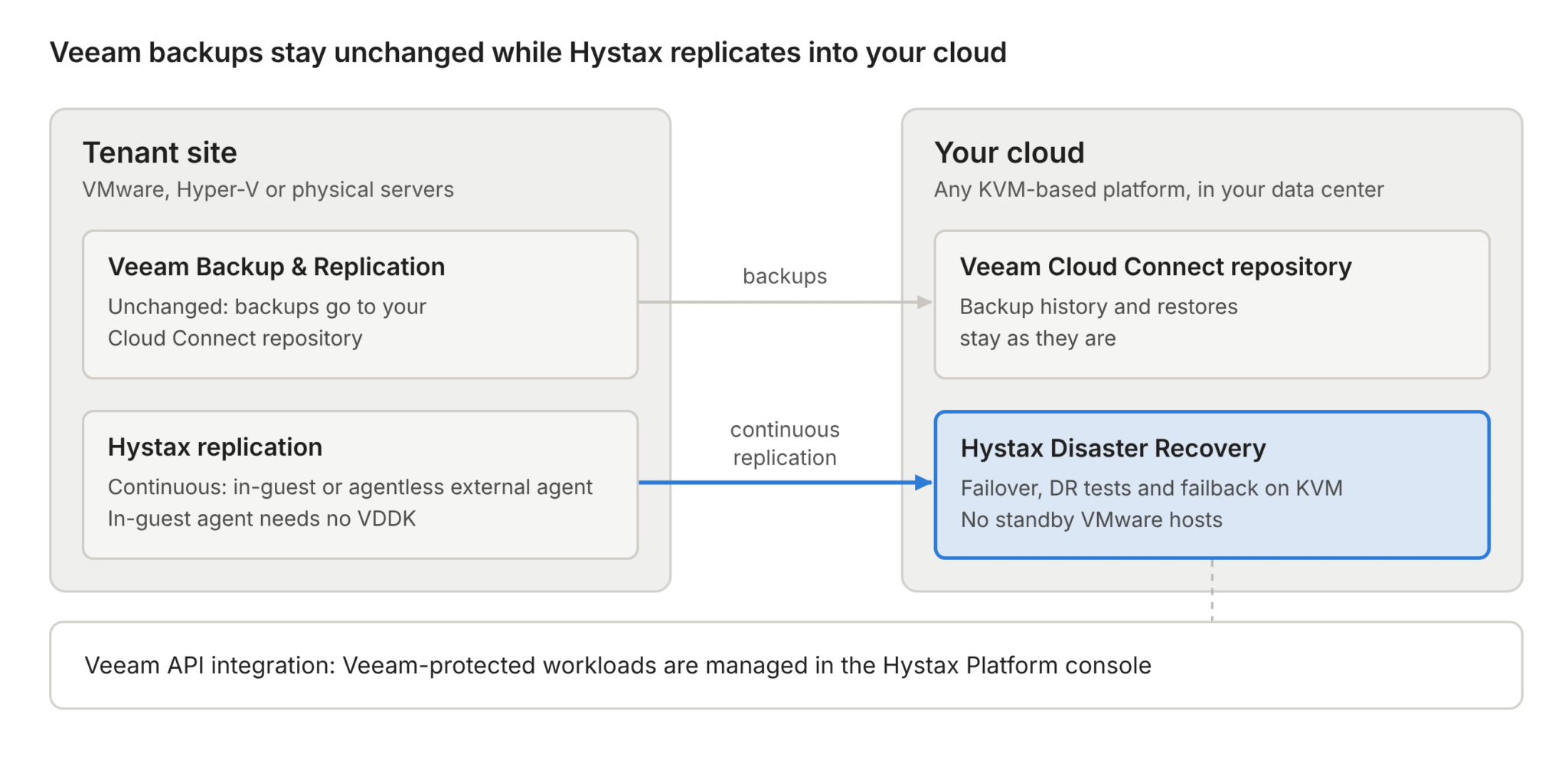
There are two separate streams: unchanged backups and continuous replication to your cloud. Hystax does not read Veeam backup files. Its Veeam API integration lets you manage Veeam-protected workloads from the Hystax Platform console.
What Veeam covers, and where it stops
The comparison reflects Veeam Backup & Replication version 13.1; Veeam’s capabilities change between releases.
| Need | Veeam Backup & Replication | Hystax Platform |
|---|---|---|
| Provider-side DR | Cloud Connect Replication: replicas on vSphere or Hyper-V hosts only | Replicas on your own KVM-based cloud, no VMware hosts |
| VM replication | Within one hypervisor: vSphere, Hyper-V, or Proxmox VE to Proxmox VE, where replicas are native Proxmox VMs | VMware and other supported sources into any KVM-based platform |
| Cross-platform recovery | Restore and Instant Recovery to supported hypervisors and clouds; Instant Recovery to Proxmox VE is experimental | Continuously updated recovery copies, orchestrated failover and DR tests per tenant |
| Failback | Replica failback within the same hypervisor | Back to the source or to another supported platform |
| Off-site backup copies | Cloud Connect Backup to your repository, or Vault, Veeam’s hosted storage | Not replaced: keep Veeam |
Veeam can recover workloads off VMware through its documented restore and Instant Recovery paths. What it does not offer is replication from VMware into a provider’s own KVM cloud: its replicas stay within one hypervisor, and Cloud Connect Replication targets vSphere or Hyper-V. That is the opening for an MSP: add independent replication and orchestrated recovery into your own KVM cloud, with control over capacity, service levels, pricing and operations.
Cloud Connect, Vault and DR are different jobs
- Cloud Connect Backup keeps tenant backup copies in your repository, and the storage revenue stays with you.
- Veeam Data Cloud Vault is Veeam-managed backup storage, priced per TB with API calls and egress included within fair use. Whether you supply Cloud Connect storage or resell Vault, you can add managed recovery on your own KVM cloud.
- Hystax Disaster Recovery maintains continuously updated recovery copies and launches the recovery environment for tests or failover. Veeam recovery from backup includes Instant Recovery on supported targets, which can run workloads before a full restore to production storage. Compare the measured recovery time, recovery points and operating model of each service before you set SLAs.
Two more opportunities with Veeam Data Cloud
Where VDDK sits, and where it doesn’t
- Internal Replication Agent. Runs inside the guest OS and replicates at block level, independently of the hypervisor. It needs no VMware API access and no VDDK.
- External Replication Agent. The agentless option for VMware reads virtual disks through VMware’s APIs and VDDK. If you already hold the library, it runs unchanged.
- Direct2Target. On the target side, a D2T agent writes recovery disks without calling the target platform’s management API, for disaster recovery since Hystax Platform 26.07.
What to prove in a pilot
Run the pilot on one named tenant, and agree the pass criteria before you start:
- Measured RPO and RTO for the tenant, against its SLA
- Application consistency on representative workloads
- I/O and WAN impact at the tenant site
- Tenant isolation and network mapping (VPN, NAT, IP addresses) on failover
- Failback to the source or another supported platform, and reprotection
- Choosing a clean recovery point after a ransomware attack
- Recovery of the DR control plane itself
- A usage report that reconciles with the invoice
Supported targets
Hystax Disaster Recovery runs on any KVM-based platform. Named targets include OpenStack, Red Hat OpenStack Services on OpenShift, Red Hat OpenShift Virtualization, KVM, KubeVirt, Virtuozzo, OpenNebula, oVirt, Oracle Linux KVM and Oracle Linux Virtualization Manager, Apache CloudStack, STACKIT and CloudSigma. VMware, AWS, Microsoft Azure, Google Cloud and Alibaba Cloud are supported as well. Versions are listed in the Hystax supported platforms documentation.
Frequently asked questions
Does Hystax replace Veeam?
No. Veeam keeps the backup jobs, retention and restores, including Cloud Connect, Vault and Veeam Data Cloud services. Hystax adds a separate replication and recovery stream into your KVM-based cloud.
Can Veeam Cloud Connect Replication target a KVM-based cloud?
No. Service providers can offer Cloud Connect Replication resources on VMware vSphere or Microsoft Hyper-V. Veeam’s Proxmox VE replication, added in version 13.1, replicates Proxmox VMs to Proxmox hosts.
Does Hystax use Veeam backups to recover workloads?
No. Hystax keeps its own continuously updated recovery copies on your KVM cloud, so failover doesn’t wait for a restore. Restores from backup stay in Veeam, and a tenant can run both services side by side.
Next step
Email Edwin Kuss, Director of Global Sales, at [email protected] to arrange a pilot on one named tenant, ending with a DR test on your own KVM cloud.
Partner tracks and terms are on the Hystax partner portal for registered partners. The Hystax Global Partner Program webinar on November 17, 2026 (register on Livestorm) walks through them.
VMware 2027 for cloud providers: the series
- Part 1: March 2027 is a licensing deadline, not a platform decision
- Part 2: Keep VMware, lose the dependency: move DR first
- Part 3: Veeam keeps the backups, Hystax runs the DR (you are here)
Subscribe to the Hystax blog to get the next parts as they are published.
Stay licensed whichever way suits you, take DR off VMware now, and move production when you’re ready.
Veeam is a registered trademark of Veeam Software. VMware and vSphere are trademarks of Broadcom Inc. or its subsidiaries. Hystax is not affiliated with or endorsed by Veeam or Broadcom.