




Table of contents
- What disaster recovery testing is and why an untested plan is not a plan
- Types of disaster recovery tests
- How often should a disaster recovery plan be tested?
- Testing during a VMware exit or upgrade
- How to build a disaster recovery test plan
- What to measure: RTO, RPO, and other test results
- Failover vs failback: test both directions
- Why DR tests fail
- Automating and orchestrating DR testing
- Failover testing on private clouds and virtualization platformsx
Disaster recovery testing is the practice of exercising a DR plan, from a walkthrough up to a real failover into a recovery environment, to confirm that recovery meets the declared RTO (recovery time objective) and RPO (recovery point objective). DR testing shows whether the plan works as written, how long recovery really takes, and how much data is lost along the way.
This guide covers six types of tests, a testing schedule by tier, a ten-step disaster recovery test plan, the metrics that turn a test into evidence, and failover testing automation.
What disaster recovery testing is and why an untested plan is not a plan
Types of disaster recovery tests
Tests range from plan reviews to full production shutdowns. NIST SP 800-34 Rev. 1 (2010) separates two kinds of exercises. Tabletop exercises are discussion-based and require no equipment, while functional exercises have staff perform recovery duties in a simulated environment. The six types below follow common industry practice. A hands-on test is often called a disaster recovery drill.
| Test type | What it checks | Effort | Risk to production | What it proves |
|---|---|---|---|---|
| Plan review/walkthrough | Contacts, steps, and dependencies; read line by line | Hours | None | PThe document is complete and current |
| Tabletop exercise | A disaster scenario discussed by IT and business owners | Half a day | None | People know their roles and escalation paths |
| Simulation test | Selected recovery steps performed against a scripted scenario | 1-2 days | Low | Teams can run the procedures within a set time |
| Parallel test | Recovery systems started and run next to production | Several days | Low to medium | Systems start and work on the recovery side |
| Full interruption test | Production shut down, business runs from the recovery site | Weeks of planning | High | End-to-end recovery, including failback |
| Non-disruptive test failover | Workloads recovered into an isolated network while production runs | Hours once automated | Very low, if the test network is isolated | Actual RTO, boot order, and data consistency |
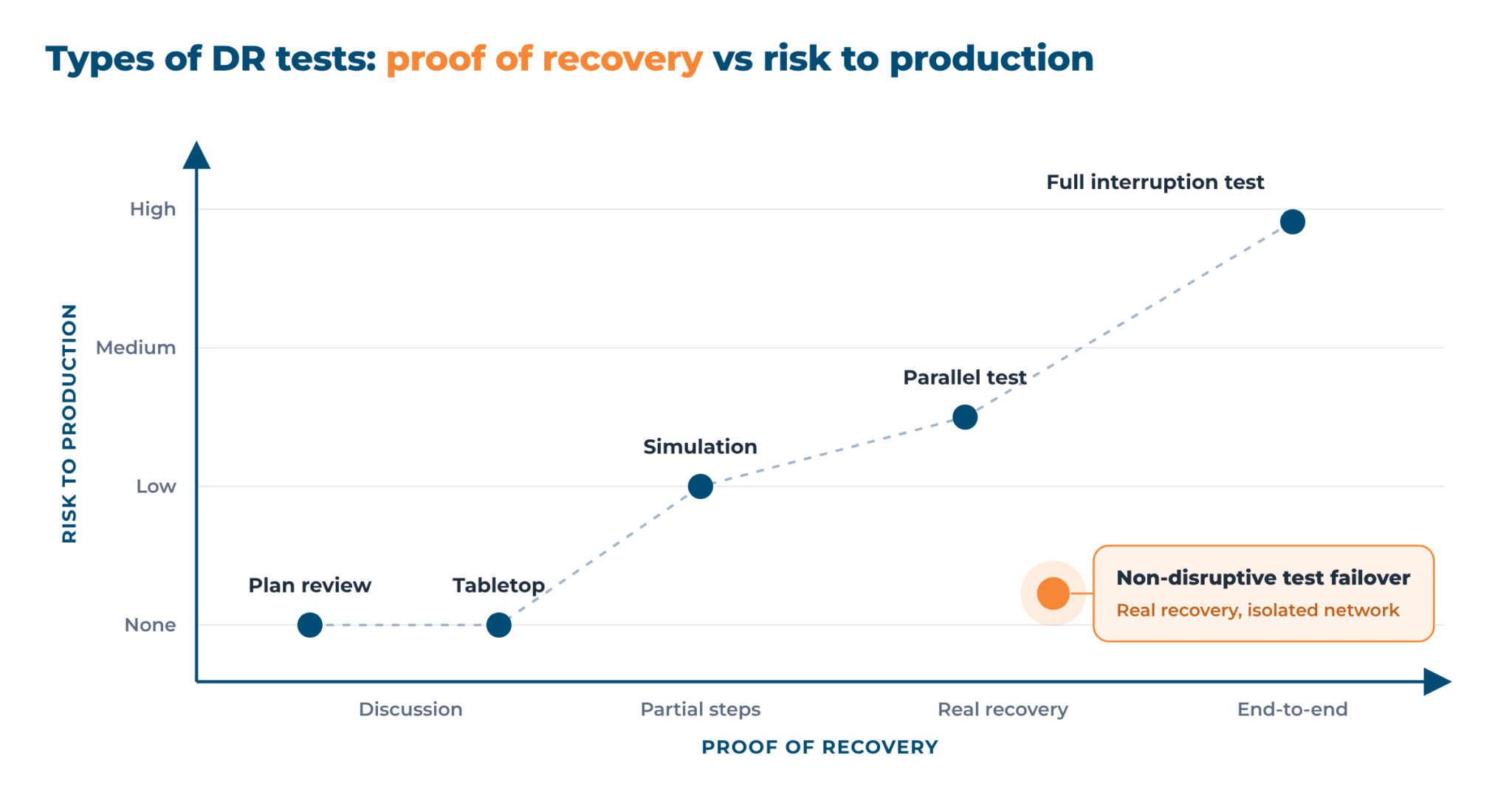
A parallel test and a non-disruptive test failover are close. The test failover is an automated form of the parallel test that modern DR tools provide. They differ in where recovery runs: a parallel test runs next to production, so shared data feeds and networks need careful management, while a test failover runs on an isolated network cut off from production.
For the business side, see how business continuity and disaster recovery strategies fit together.
How often should a disaster recovery plan be tested?
The usual floor is one test a year for every critical system, and another after any major change. Tier 1 systems are tested more often.
A test failover is cheap to repeat and does not touch production when the test network is isolated, so quarterly runs are realistic.
The table is a starting schedule that teams adapt.
| Tier | Example workloads | Test type | Frequency | Unplanned test after |
|---|---|---|---|---|
| Tier 1, critical | Core databases, payments, customer-facing apps, and identity | Test failover and tabletop, plus a full interruption test where the business allows it | Test failover quarterly; tabletop and full interruption test yearly | Major change, platform migration, failed test, or internal audit finding |
| Tier 2, important | ERP reporting, internal business apps, and file services | Non-disruptive test failover | Twice a year | Change to the application or its dependencies |
| Tier 3, deferrable | Dev and test, archives, and tools that tolerate days of downtime | Plan review/walkthrough | Yearly | Move to new storage or a new hypervisor |
Test schedule by workload tier
Testing during a VMware exit or upgrade
infrastructure, auto-testing configured in the plan, and failback to production
Thank you for your request!
We will be in touch soon.
How to build a disaster recovery test plan
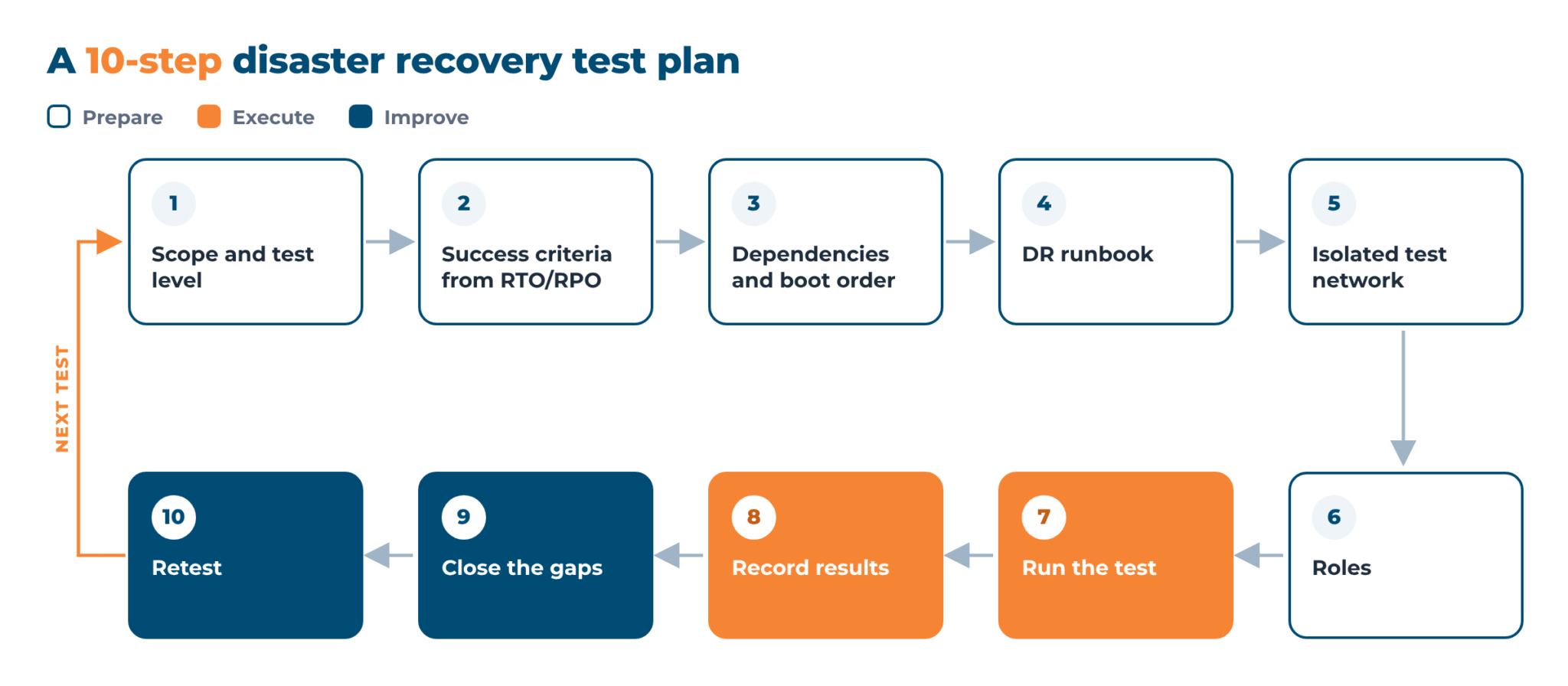
A solid disaster recovery test plan defines four things: what is tested, how success is judged, who does what, and where findings go.
The ten step titles double as a DR test plan template and checklist.
- Define scope and test level. Pick the systems, their tier, and a test type from the tables above. Add at least one ransomware scenario, with recovery from a clean copy.
- Set success criteria from RTO and RPO. Write a pass criterion for each system, for example, running within 60 minutes with at most 15 minutes of data lost.
- Map application dependencies and boot order. List what each system needs, such as databases, directory services, DNS, license servers, and firewall rules, and the order in which systems start.
- Write the disaster recovery runbook. A DR runbook is the step-by-step recovery procedure. It names owners, expected results, and the place where credentials are kept, and someone who did not write it should be able to follow it.
- Prepare an isolated test network. Build a sandbox with no route to production, so duplicate IP addresses and hostnames cannot collide with live systems.
- Assign roles. You need a test lead and an owner for each system, plus an observer to log times and a business representative to sign off.
- Run the test. Follow the runbook exactly as written, and log start and finish times, every deviation, and every manual fix.
- Record the results. The test report covers scope, date, targets, measured values, failures, and open risks.
- Close the gaps. Fix the runbook, configuration, credentials, or licenses, and assign an owner and due date to every finding.
- Retest. Repeat whatever failed, update the plan, and schedule the next test.
What to measure: RTO, RPO, and other test results
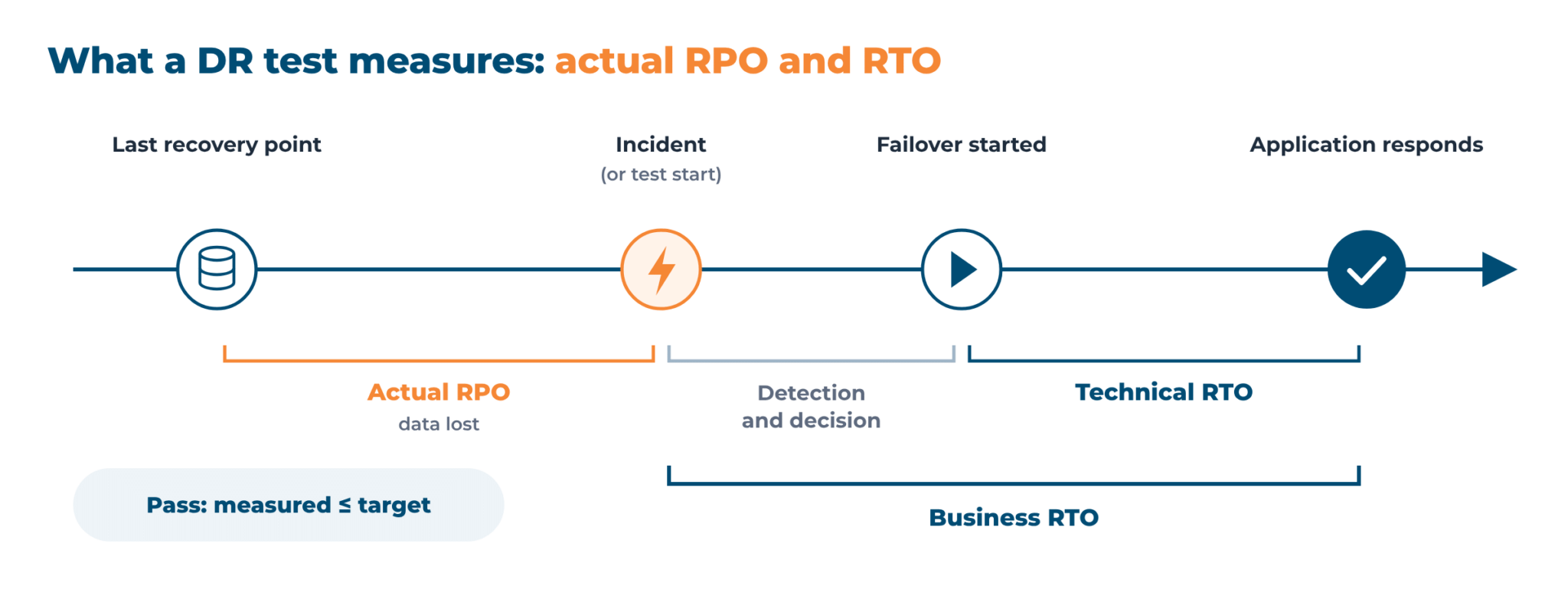
RTO and RPO, the recovery objectives, are only targets until a test measures them. The difference between RTO and RPO has its own article, so this section covers measurement. Six metrics are enough.
| Metric | How it is measured in the test | Pass criterion | Typical failure |
|---|---|---|---|
| Actual RTO | Time from the failover command until the application answers a test request (technical RTO); the business RTO also counts detection and decision time | Technical RTO plus detection and decision time is at or below the business RTO | Slow disk restore, wrong boot order, manual steps |
| Actual RPO | Age of the newest data in the recovered system, compared with the moment the test failover was started | At or below the target RPO | Replication lag, skipped schedule, older recovery point than assumed |
| Data integrity check | Checksums, row counts, or queries compared with the source | No corrupted or missing records | Crash-consistent copy of a busy database; application-consistent snapshots avoid it |
| Application-level health check | Login, a key transaction, and an API call, end to end | All critical transactions pass | The machine boots, but the app cannot reach DNS, the database, or the license server |
| Failback time | Time to return workloads and changed data to production | Within the planned maintenance window | Failback never tested, large volume of changes |
| Manual interventions | Number of steps done outside the runbook or automation | Every step documented | Fixes known only to one engineer |
Metrics for a DR test, with pass criteria and typical failures
Failover vs failback: test both directions
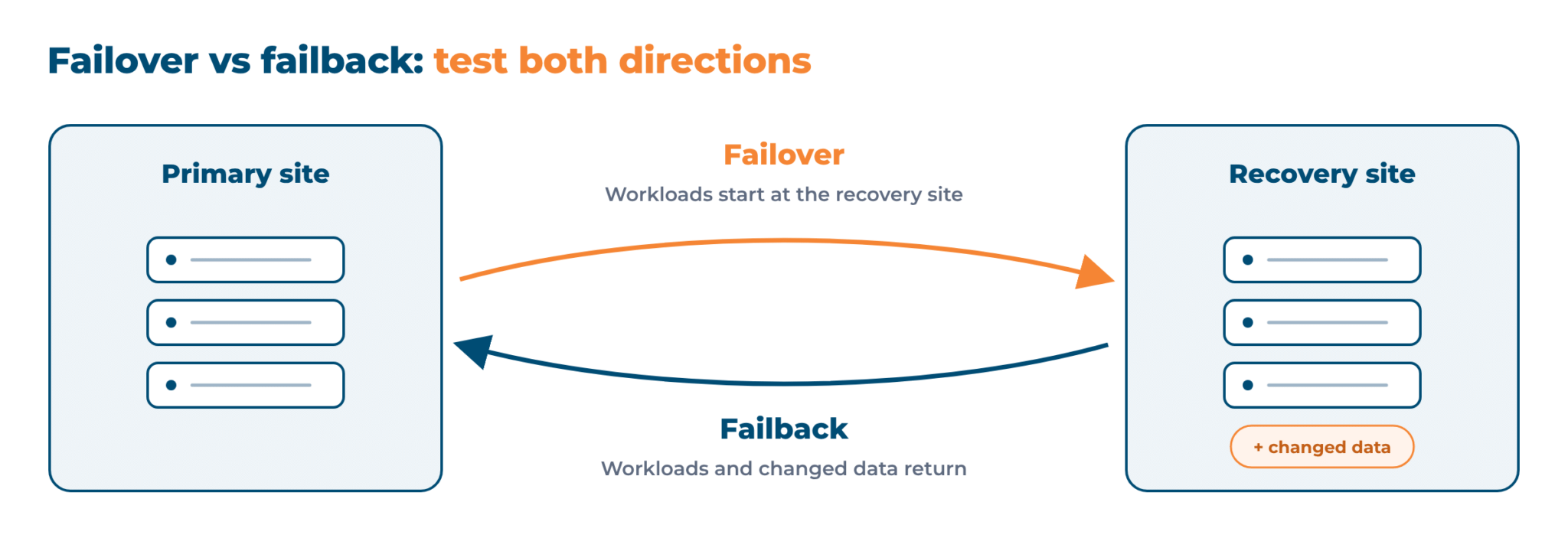
Failover moves workloads to the recovery site, and failback returns them once the primary site is repaired, with the data changed in the meantime. Failover testing is routine, but failback is easy to skip, so the first real failback goes untested. The yearly full interruption test is the natural place to include it and time it. Where production cannot be shut down, the closest substitute is a test failover and failback of the full stack in an isolated environment.
Why DR tests fail
Recovery often misses its targets. In Veeam’s 2024 Data Protection Trends survey of 1,200 IT leaders, respondents reported that only 58% of servers met their recovery SLA in the last large-scale attack. Seven causes are common.
- The recovery site differs from production. Changes reach production but not the recovery site.
- Dependencies stay unverified. DNS, directory services, license servers, and third-party APIs are assumed to work.
- There is no isolated network. Teams fear collisions with live systems and keep postponing the test, although a sandbox reduces the risk.
- Credentials and licenses expire. Service accounts, certificates, and license keys run out between tests.
- The runbook belonged to someone who left. Nobody else knows the unwritten steps.
- Success criteria were never set. A server that boots counts as a pass.
- Only infrastructure is tested. The virtual machine starts, but nobody checks that the application works.
Reversing these causes gives the core of disaster recovery testing best practices.
Automating and orchestrating DR testing
Manual testing works for a few machines. With more machines, the runbook grows long, and people run it slowly and differently each time. Disaster recovery automation moves individual steps into software: replicating data, starting machines, and checking the result.
Disaster recovery orchestration coordinates those steps in a recovery sequence: which machines start first and which wait, which network each one joins, and which health check completes a step.
The same sequence later drives the real failover. In Veeam’s 2024 Data Protection Trends survey, only 13% of organizations used orchestrated workflows in their disaster recovery processes.
Automation also makes the non-disruptive test failover practical. Replication keeps a copy of each protected machine at the recovery site. At test time, the tool builds machines from a chosen recovery point or snapshot inside an isolated test network. Production keeps running, and the test machines are deleted when the checks finish.
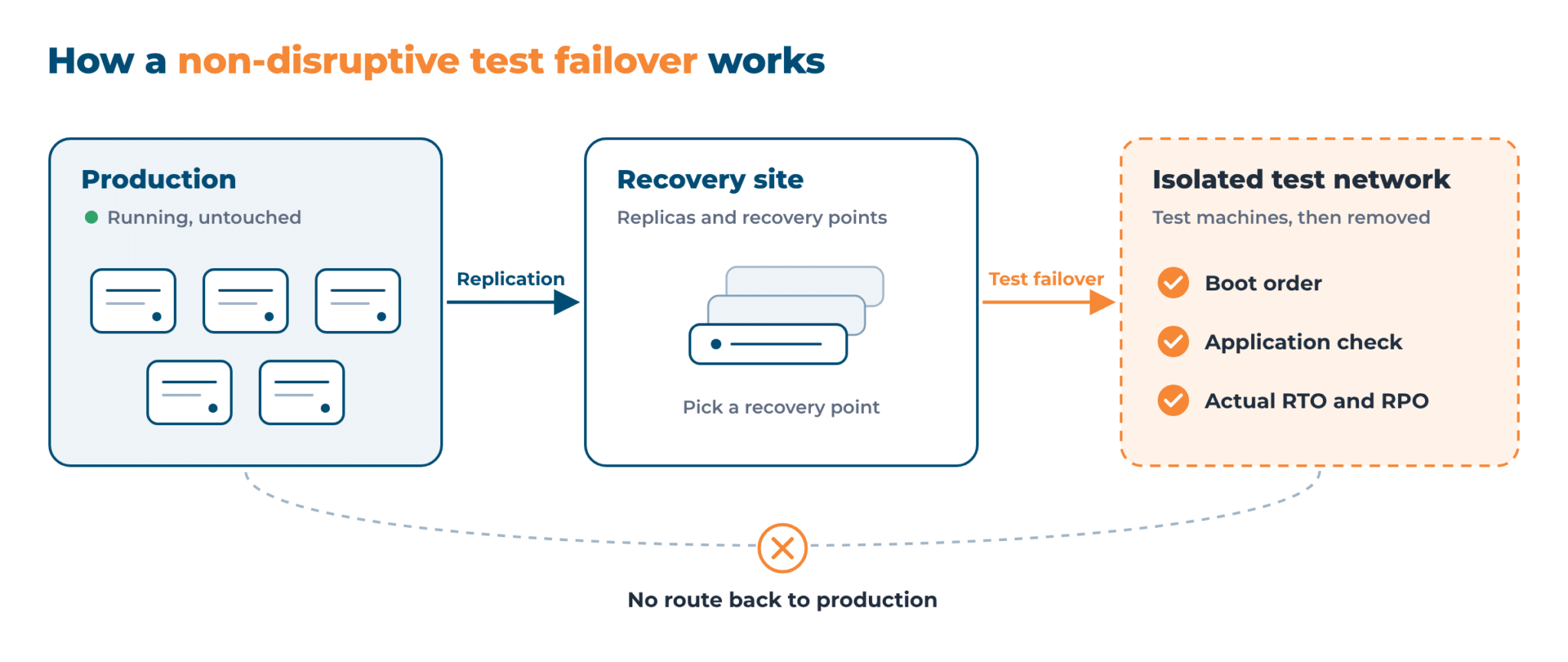
In tools that support scheduled tests, a test failover can run unattended every quarter, and each run produces a report with times, the measured RTO, and failed steps for auditors to review.
Failover testing on private clouds and virtualization platforms
Hystax Disaster Recovery, part of Hystax Platform, supports two replication modes:
- Agentless replication works at the platform level through an external Hystax agent, with nothing installed in the guest OS. It is available for VMware, OpenStack, and oVirt.
- Agent-based replication uses a Windows or Linux agent inside the guest OS and covers other hypervisors, VMs in public clouds, and physical servers.
DR plans are generated from the replicated infrastructure, and auto-testing can be set up within the plan.
On Red Hat OpenShift Virtualization, for example, teams can validate plans in an isolated environment at any time without affecting production workloads. For the ransomware scenario from step 1 of the test plan, the built-in ransomware protection flags an abnormal volume of changed data during replication.
The platform then places the machine in a Suspended state: it stops creating new restore points and does not apply the retention policy, so earlier clean restore points stay available.
Recovery targets include OpenStack, VMware, KVM, Red Hat OpenShift Virtualization, Virtuozzo, oVirt, OpenNebula, and KubeVirt, plus AWS, Azure, Google Cloud (GCP), and Alibaba Cloud. Failback to the primary site is built in. Recovery can also run across clouds.
Adam Data Center, an independent Spanish IaaS provider with data centers in Madrid and Barcelona, added disaster recovery to its OpenStack-based cloud with Hystax. According to the March 2026 case study, destination systems boot individually or in groups while respecting dependencies, and contingency environments can be deployed and validated without stopping production.
Talk to Hystax engineers about testing recovery plans on the stack you use
Thank you for your request!
We will be in touch soon.
Frequently asked questions
What is disaster recovery testing?
Disaster recovery testing means exercising a DR plan to check recovery against the declared RTO and RPO. The test can be a team discussion or a real failover. It finds outdated dependencies, expired credentials, and missing steps before a real outage does.
What are the types of DR tests?
There are six common types: plan review, tabletop exercise, simulation test, parallel test, full interruption test, and non-disruptive test failover. The range runs from discussion to a full production shutdown. Most teams mix several, exercising safer tests often and heavy tests yearly.
How often should a DR plan be tested?
The baseline is one test a year per critical system, plus one after major changes such as a platform migration. Critical workloads can be tested quarterly with a test failover, because with an isolated test network it does not affect production. DORA requires annual testing for EU financial entities.
What is a non-disruptive test failover?
A non-disruptive test failover recovers workloads from replicated data into an isolated test network while production keeps running. Production users are not affected. The test machines are removed afterward, so teams can measure real recovery time and verify applications as often as needed.
Who is responsible for DR testing?
The IT or infrastructure owner leads the test, system owners run their recovery steps, and a business representative signs off the result. Management owns the recovery targets. With DRaaS, the provider handles much of the testing, but the customer still validates applications and approves the results.
What is the difference between failover and failback?
Failover moves workloads from the primary site to the recovery site, in a real outage or during a test. Failback returns them once the primary site is repaired, along with the data changed in the meantime. Both directions need testing, because only a tested failback shows whether changed data returns intact.
What should a DR test report contain?
A DR test report records scope, date, and test type, target and measured RTO and RPO, data and application check results, failback time, manual interventions, failed steps, and open risks. Each finding gets an owner and a due date. It also serves as audit evidence.
A recovery plan is only as good as its last successful test. Walkthroughs and real failovers expose gaps and missing dependencies, so the plan is reviewed after every test and major change.
For test types, frequency, and a step-by-step plan, see our guide on how to test a disaster recovery plan.