



Table of contents
- What is cloud repatriation?
- Cloud repatriation trends: why companies move workloads back
- Full vs partial repatriation: which workloads are good candidates?
- Cloud vs on-premises cost: how to compare TCO
- Cloud exit strategy step by step
- Risks of reverse cloud migration and how to reduce them
- Publicly reported examples: 37signals, Dropbox, and GEICO
- How Hystax Platform supports cloud repatriation
Key takeaways
- Steady workloads tend to cost less on owned infrastructure. Workloads with sudden peaks usually cost less in the public cloud.
- Rightsizing and commitment discounts can shrink the gap between public cloud and owned infrastructure costs so much that moving no longer pays off.
- Cloud providers waive exit fees for customers who leave, and the EU Data Act bans switching charges from January 2027.
- After repatriation, the public cloud can stay in use as a disaster recovery site.
Cloud repatriation means moving applications, data, or virtual machines from a public cloud back to infrastructure a company controls. That can be a private cloud, an on-premises data center, or a colocation facility. Most projects cover selected workloads; full repatriation is rare.
What is cloud repatriation?
For years, “cloud first” was the default strategy, and many teams moved as much as they could. Most companies now run a mix of environments: according to Flexera’s 2026 State of the Cloud Report, 73% of organizations use a hybrid cloud. In a hybrid setup, cloud repatriation is part of workload placement. The terms below often get mixed up, so here is how they differ.| Term | What it means | Typical scope |
|---|---|---|
| Cloud repatriation | Moving workloads or data from public cloud to private, on-premises, or colocation infrastructure | One app, a data tier, or a group of VMs |
| Reverse cloud migration | Another name for repatriation that puts the stress on the direction of the move | Same as repatriation |
| Cloud exit | Leaving a public cloud provider completely, for on-premises or another cloud | All workloads and data |
| Workload placement | The ongoing practice of deciding where each workload should run | The whole portfolio |
Cloud repatriation trends: why companies move workloads back
Cost of steady workloads
Pay-as-you-go pricing suits variable demand well. A workload that runs at the same level around the clock is another matter, and over a few years it can cost more in the cloud than on owned hardware. On-demand pricing lets you scale up and down at any time, and a workload that never scales still pays for that option without using it.
Egress fees
AI and GPU workloads
Security and data sovereignty
Concerns about data breaches and compliance also push some workloads back. Companies in regulated industries, such as finance and healthcare, need to know where their data lives and who can reach it. For some, that means moving sensitive systems to a private cloud. Others move to a sovereign cloud such as STACKIT, which keeps data in EU data centers.
Book a demo to see how to move your VMs from AWS, Azure, or Google Cloud to a private cloud
Thank you for your request!
We will be in touch soon.
Full vs partial repatriation: which workloads are good candidates?
Full repatriation suits companies with stable demand, a large cloud bill that barely changes from month to month, and their own operations team. Most others choose partial repatriation, moving the workloads where owned infrastructure clearly wins and leaving the rest in the cloud.
| Good candidates for repatriation | Better kept in the public cloud |
|---|---|
| Production workloads with a flat 24/7 load: they pay on-demand prices for capacity they always use | Seasonal workloads: owned hardware would sit idle between peaks |
| Large databases and storage tiers with high egress: every transfer out adds to the bill | Short-lived dev environments and proofs of concept: they end before purchased servers pay off |
| Production AI inference with constant GPU use: the GPUs are busy all the time | Experiments that need the newest GPUs for a few weeks: buying that hardware for a short test is rarely worth it |
| Systems with strict data residency or audit rules: owned infrastructure makes data location easy to prove | Apps built on managed, provider-specific services: each service would have to be replaced or rebuilt |
| Legacy VMs lifted and shifted unchanged: they use no cloud-native services, so they move without rework | Global services that need many regions: matching that footprint means running many data centers |
Idle or oversized workloads are a separate case. Flexera’s 2026 report puts wasted cloud spend at 29%, its first rise in five years. That waste is a cost-management problem, and moving the workloads to owned hardware keeps it in place.
Cloud vs on-premises cost: how to compare TCO
Comparing cloud vs on-premises costs is harder than it looks. In Flexera’s 2026 survey, 43% of respondents cited it as a cloud migration challenge, ranking it third. A fair comparison uses the same time horizon on both sides (typically three to five years) and the same service level.
This formula applies to both public and private cloud:
TCO = upfront costs + monthly running costs × number of months
In the public cloud, almost everything is a running cost: compute, storage, egress, support, and managed services. A private cloud moves much of the spending upfront into hardware and the migration project. It also adds running costs for data center space, licenses, operations staff, and a backup or DR site.
Worked example
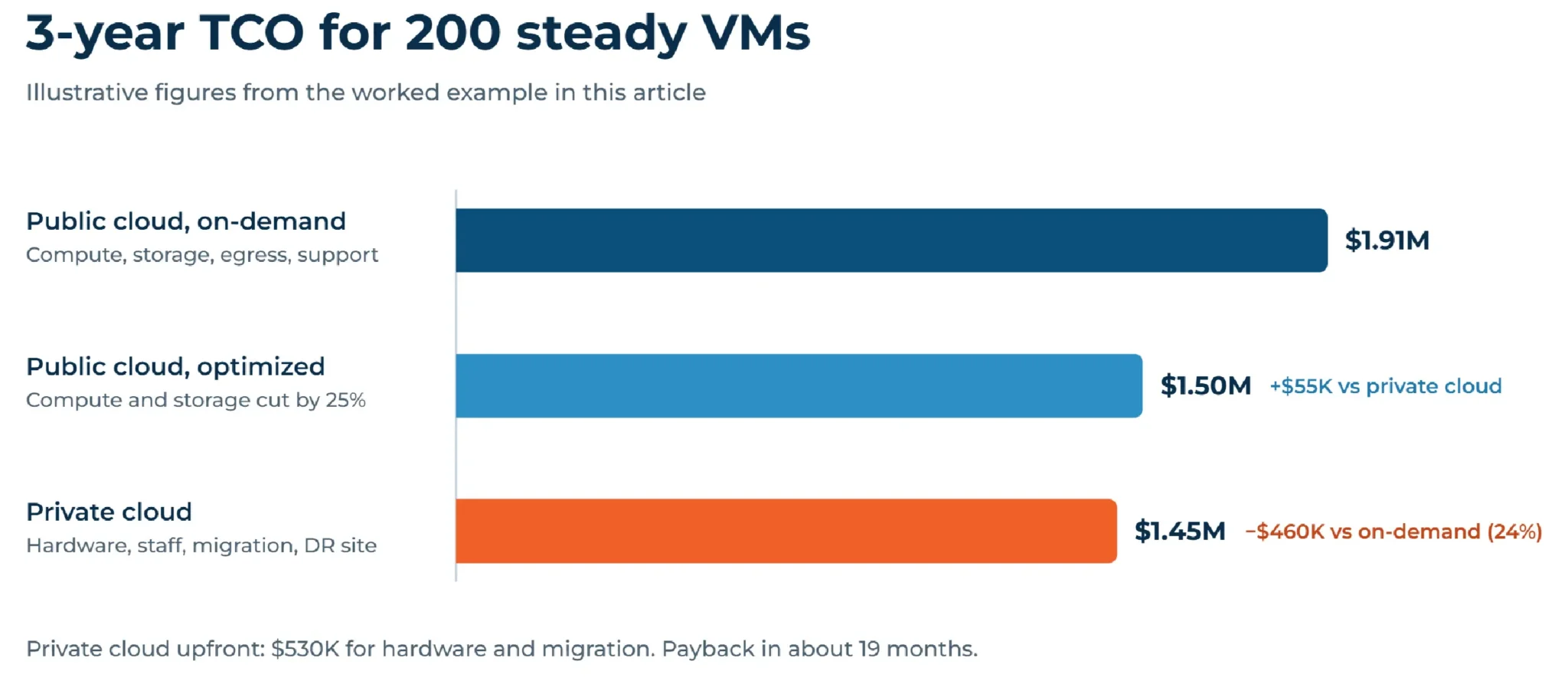
The figures below are illustrative. The example assumes 200 steady production VMs over three years.
| Cost line | Public cloud, 3 years | Private cloud, 3 years |
|---|---|---|
| Compute and storage | $1,620,000 ($45,000/month) | $450,000 (hardware) |
| Egress | $108,000 ($3,000/month) | — |
| Data center, power, and network | — | $216,000 ($6,000/month) |
| Support, licenses, and managed services | $180,000 ($5,000/month) | $180,000 ($5,000/month) |
| One-time migration project | — | $80,000 |
| DR and backup site (kept in the public cloud) | — | $72,000 ($2,000/month) |
| Total | $1,908,000 | $1,448,000 |
In this scenario, the private cloud saves $460,000 over three years, or about 24%. With $530,000 spent upfront on hardware and migration, payback comes after roughly 19 months. The public cloud figures assume the compute and storage line includes backup and multi-zone redundancy.
Optimizing the cloud side changes the picture. If commitment discounts and rightsizing cut the cloud compute and storage line by a quarter, the gap drops to about $55,000, too thin to justify a move on cost alone.
Cloud exit strategy step by step
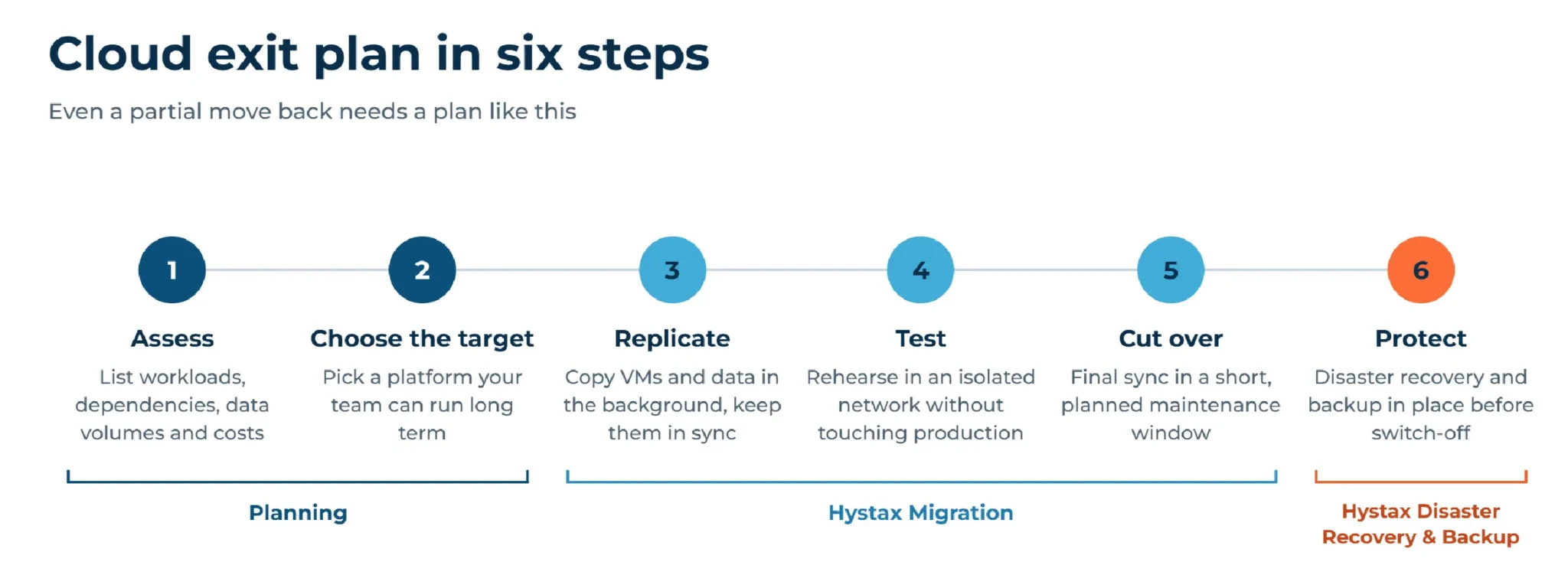
Even a partial move needs a plan that works like a cloud exit strategy. It follows the logic of any migration project, only in reverse.
- Assess. List workloads, dependencies, data volumes, and current costs, then mark each one as move, keep, or rework.
- Choose the target. Pick a platform your team can run long term. Weigh existing skills, licensing costs, and whether VMs need to run next to containers, as they do on KubeVirt and Red Hat OpenShift Virtualization. Many teams choose a KVM-based platform such as OpenStack or OpenNebula. Size compute and storage with growth in mind.
- Replicate. Copy VMs and data in the background, then keep the copies in sync until cutover.
- Test. Run test migrations in an isolated network to check integrations and boot order without touching production.
- Cut over. Run a final incremental sync during a short, planned maintenance window, with a rollback plan ready.
- Protect. Have disaster recovery and backup in place for the new platform before you switch off the cloud resources.
Risks of reverse cloud migration and how to reduce them
Problems in a repatriation project often trace back to costs or dependencies missed during planning. The table lists the common ones and how to reduce them.
| Risk | How to reduce it |
|---|---|
| Hidden dependencies on managed cloud services | Map dependencies early and plan replacements for proprietary databases, queues, and identity services |
| Underestimated hardware and staff costs | Put refresh cycles, spare capacity, and operations salaries into the TCO model |
| Downtime during cutover | Replicate continuously and rehearse with test migrations, so the final switch stays short |
| Lost resilience after leaving multi-region cloud | Set up disaster recovery to a second site; a public cloud region works |
| Egress costs during the move | Check provider waivers, and budget for traffic if some workloads stay in the cloud |
| Skills gap | Train the team before cutover or bring in a managed service provider |
Publicly reported examples: 37signals, Dropbox, and GEICO
Three companies have described their moves in their own words. Each moved a different share of its workloads.
37signals
Dropbox
GEICO
How Hystax Platform supports cloud repatriation
The platform covers the technical side of repatriation: the move itself, then disaster recovery and backup afterward.
Hystax Migration moves VMs from AWS, Azure, Google Cloud, and Oracle Cloud to private, sovereign, and virtualization platforms. With public cloud sources, a replication agent runs inside each guest OS and copies data in the background while production keeps running. After the first copy, only changed blocks travel over the network.
- Supported targets include OpenStack, Red Hat OpenStack Services on OpenShift, OpenNebula, Apache CloudStack, KubeVirt, Red Hat OpenShift Virtualization, Oracle Linux KVM, Oracle Linux Virtualization Manager, Virtuozzo, CloudSigma, STACKIT, VMware, and oVirt.
- Direct2Target writes data straight to the target disks without relying on the platform’s management APIs, so any environment with disk-level write access can serve as a target.
- Test migrations run in an isolated network, with no limit on how many. The final cutover takes 1 to 3 minutes on average.
- Migration plans set boot order and network settings, so applications start in the right sequence.
Constructor Group, a global research, education, and technology ecosystem, used Hystax Migration to move its workloads from Google Cloud to Virtuozzo. The company cited long-term cost and platform dependency as reasons for leaving, and it wanted a platform it could control and tune more fully. Its applications stayed online throughout the transition.
Hystax Disaster Recovery protects the workloads after the move. Leaving a hyperscaler doesn’t mean giving up the public cloud as a safety net: with cross-cloud disaster recovery, AWS, Azure, or Google Cloud can serve as the recovery site. Replicas are kept there as volumes and snapshots, and full VMs start only when they’re needed.
For longer retention, Hystax Backup writes restore points to S3-compatible object storage or to NFS and Samba shares. On S3-compatible storage configured with Object Lock, restore points stay immutable for the retention period.
You can deploy the software in your own environment, so replication data stays under your control. Managed service providers get a multi-tenant partner portal for running several customer projects at once. Supported migration scenarios are listed on the cloud migration page.
Tell us about your environment. Our engineers will map the options for your source and target platforms, including disaster recovery after the move.
Thank you for your request!
We will be in touch soon.
Frequently asked questions
What is cloud repatriation in simple terms?
It means taking workloads or data out of a public cloud and running them on infrastructure your company controls. For example, a database with a steady load might move from AWS to an OpenStack private cloud.
Is reverse cloud migration the same as cloud repatriation?
The two terms describe the same move. A cloud exit is a different term: it means leaving a provider completely, and the workloads can go on-premises or to another cloud.
Does cloud repatriation always save money?
No. Savings show up for steady, predictable workloads at scale. Workloads with sudden peaks can cost more, and so can projects that underestimate hardware, staff, or migration costs. Build a three- to five-year TCO model first.
How long does a repatriation project take?
There is no typical figure: duration depends on the number of workloads, the data volume, and network bandwidth. Production stays online during replication, and the Hystax cutover itself averages 1 to 3 minutes.
Can I keep using the public cloud after repatriation?
Many companies do. A common hybrid setup keeps steady workloads in a private cloud and uses the public cloud for sudden peaks, experiments, and disaster recovery.
Do I need agents to migrate VMs from AWS, Azure, or Google Cloud?
For these sources, yes. Hystax replicates public cloud VMs through an agent installed in the guest OS. Replication without in-guest agents is available only for VMware, oVirt, and OpenStack sources.