




Table of contents
Broadcom’s licensing changes have pushed many VMware customers toward OpenStack, and one of the first tools OpenStack teams come across is MigrateKit. It is free, open source and built by VEXXHOST, an OpenStack cloud and consulting provider. For a few simple VMs, it may be all you need.
Most migrations, though, are more than a disk copy. They involve planning, rehearsals, cutover waves, network mapping and a way back if something breaks. This guide compares MigrateKit and Hystax Platform at each step, so you can decide which fits your project.
In short: on the copy itself, the two tools work similarly. The difference is everything around the copy, which MigrateKit leaves to your team and Hystax Platform builds into the migration.
What MigrateKit is
MigrateKit is a command-line tool that moves VMware virtual machines to OpenStack. It is released under the Apache-2.0 license, has no UI or API and handles one VM per command. VEXXHOST sells migration services around it.
It works in two phases. In the migration phase, it copies the VM while it runs; subsequent runs copy only the changed blocks. In the cutover phase, it powers off the source VM, runs a final sync and builds the OpenStack instance from the copied volumes.
How each tool moves a VMware VM to OpenStack
Both tools start from the same VMware snapshots and write to OpenStack Cinder volumes. What happens in between is where they part ways.
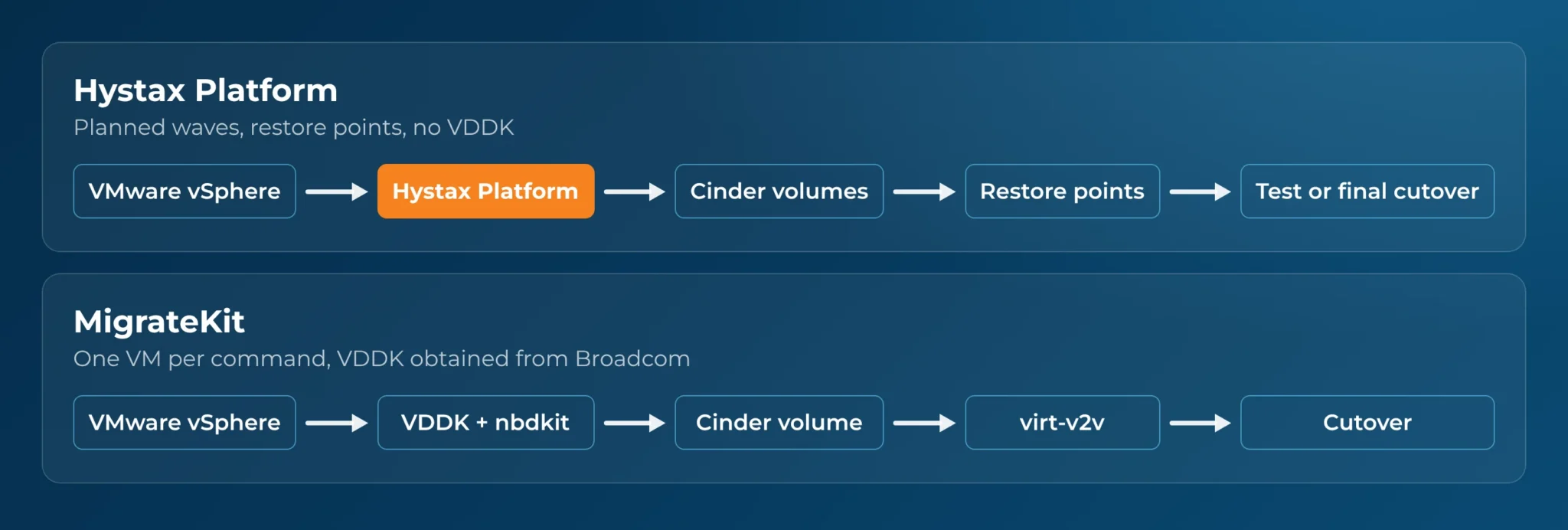
MigrateKit depends on VDDK, writes to a single volume and converts the guest with virt-v2v at cutover. Hystax Platform reads disks without VDDK, keeps restore points and lets you run test migrations before the final cutover.
How MigrateKit and Hystax Platform compare
On the core copy, the two tools take the same approach: each takes VMware snapshots, makes one full copy and then copies only changed blocks, so most data moves while the VM keeps running.
Everything else differs, starting with scope. MigrateKit covers one path: VMware vCenter or ESXi to OpenStack. Hystax Platform migrates from VMware, OpenStack and oVirt without agents, or from any VM or physical machine with Windows or Linux agents, to about 20 cloud types, including OpenStack, AWS, Azure, GCP, vSphere, KubeVirt and CloudStack.
Access to VMware disks: with or without VDDK
Transport: management network or datastore
MigrateKit reads data only over the ESXi management network, using NBD or NBDSSL; the mode is fixed in the code. With large disks, that network carries the whole copy.
Hystax Platform supports NBD, NBDSSL and HotAdd, tried in a set order with fallback. NBD is the default. HotAdd, switched on per machine, reads disks through the datastore instead of the management network, which helps with large disks or a busy network.
Guest conversion and network mapping
A VMware VM needs changes before it boots on OpenStack: virtio drivers, a rebuilt initrd and bootloader fixes. MigrateKit hands this to virt-v2v, which runs in place on the copied volume. Its README warns that skipping this step may leave the instance unbootable. Hystax Platform converts the guest with its own engine.
Networking takes the most manual work in MigrateKit. It can’t map network settings from VMware, so at cutover you pass a flag for each NIC with its MAC address, network, subnet and IP. In Hystax Platform, ports, static IP and MAC addresses, subnets and security groups are set once in the migration plan.
Planning, cutover waves and test migrations
MigrateKit handles one VM per command, with no batching, scheduling or test-migration mode. Repeat syncs are manual runs that write to a single target volume. For a handful of VMs, that is workable. For hundreds, someone has to script the waves, track progress and rehearse each cutover.
Hystax Platform groups VMs into migration plans with boot ordering, so multi-tier applications start in the right sequence. Incremental syncs run on a schedule, and retention policies keep several restore points per VM. Test migrations can be deleted and repeated until cutover night holds no surprises. For an example at scale, see how a global payroll enterprise moved 4,500+ VMs from VMware to Red Hat OpenStack.
After cutover: failback and disaster recovery
MigrateKit’s job ends at cutover. It keeps no restore points and offers no failback, so if an application fails on day two, your team must get it back to VMware.
Hystax Platform supports failback to VMware and OpenStack, and the same platform runs disaster recovery plans after the migration. If you need disaster recovery for OpenStack after the move, you don’t need a second tool.
Day-to-day operation and support
Side-by-side summary
| Capability | Hystax Platform | MigrateKit |
|---|---|---|
| Sources | VMware, OpenStack and oVirt without agents; any VM or physical machine with Windows or Linux agents | VMware vCenter or ESXi only |
| Targets | About 20 cloud types, including OpenStack, AWS, Azure, GCP, vSphere, KubeVirt and CloudStack | OpenStack only |
| VMware disk access | Snapshots and changed-block tracking through its own implementation; no VDDK | Snapshots and changed-block tracking through VDDK and nbdkit; you obtain VDDK from Broadcom |
| Transport modes | NBD, NBDSSL and HotAdd, with fallback; HotAdd switched on per machine | NBD and NBDSSL only |
| Incremental sync | Scheduled, with retention policies and multiple restore points | Manual repeat runs; one target volume |
| Guest conversion | Own engine: virtio drivers, initrd rebuild, bootloader fixes | virt-v2v in place |
| Network mapping | Set in the plan: ports, static IP and MAC, subnets, security groups | Manual flag per NIC, keyed on MAC |
| Orchestration | Migration and DR plans, boot ordering, repeatable test migrations | One VM per command |
| DR and failback | DR plans; failback to VMware and OpenStack | None |
| Footprint | Controller VM, replication appliance per ESXi host or cluster, cloud agent in the target | One privileged container |
| Cost and support | Per-machine license, versioned releases | Free; paid services from VEXXHOST; no tagged releases |
Leave your business email, and a Hystax engineer will walk you through a test migration, cutover plan and failback for your VMware to OpenStack project
Thank you for your request!
We will be in touch soon.
The real cost of a free tool
The free tool has clear advantages. It costs nothing to license, needs no procurement and can be running in an afternoon for a small job. It is built on open-source parts, nbdkit and virt-v2v, that many OpenStack teams already know and trust.
The software is free, but the project isn’t. Batching, network mapping, test runs and rollback still have to happen for every VM, so someone has to script them and then maintain those scripts. Before you choose, estimate those engineering hours and compare them with the platform’s license cost.
How to choose
Your answers to a few practical questions usually settle the choice:
- How many VMs are you moving, and in how many cutover waves?
- How will you rehearse the cutover before the real one?
- What is your way back if a migrated application fails on day two?
- How many Windows servers and multi-disk VMs are in scope?
- Who will record the MAC, IP and subnet for every NIC?
- Who will you call if something breaks during the cutover window?
- How large are the disks, and can the ESXi management network carry the copy?
- Does any workload sit outside VMware, or need a target other than OpenStack?
MigrateKit is likely enough if you have up to about 20 simple Linux VMs, a skilled in-house OpenStack team and no fixed deadline. In that case, try it first.
A migration platform such as Hystax Platform is the better fit if any of these apply:
- hundreds of VMs or several cutover waves;
- Windows servers or multi-disk VMs;
- many tenants to migrate, as a service provider or integrator;
- sources other than VMware, or targets other than OpenStack;
- a need for disaster recovery or failback after the migration.
Leave your business email. Our engineers will review your VMs, networks and deadline, then map out the options for your move from VMware to OpenStack
Thank you for your request!
We will be in touch soon.
Frequently asked questions
Does MigrateKit need VDDK?
Yes. It reads VMware disks through VDDK and nbdkit, and you must obtain VDDK from Broadcom yourself. Broadcom removed the public VDDK downloads in August 2026.
Is MigrateKit still maintained?
Yes, but slowly. The last change was merged on November 13, 2026, the repository has no tagged releases, and most commits since September 2025 are dependency updates.
Can MigrateKit migrate Windows VMs?
It can, but its open issues include a Windows Server 2022 reboot loop after migration and failed root-disk detection on multi-disk VMs. Test Windows workloads before you commit to a cutover date.
Can Hystax Platform handle disaster recovery after the migration?
Yes. The same platform runs disaster recovery plans and supports failback to VMware and OpenStack.